Workshop 3 Preview: Zenoh Fundamentals (Exercises 1-3)
Part 1 of 3: Core Pub/Sub, QoS, and Shared Memory Transport
What This Series Covers
ROSCon India 2025 Workshop 3 features 8 hands-on exercises exploring Zenoh middleware for ROS 2. This 3-part preview series helps you understand what you’ll learn:
| Part | Exercises | Focus |
|---|---|---|
| Part 1 (This Post) | 1-3 | Fundamentals: Pub/Sub, QoS, Shared Memory |
| Part 2 | 4-5 | Remote: Cloud Router, mTLS Security |
| Part 3 | 6-8 | Advanced: Wireless, Congestion, NAT |
Visual Summary: 7 Eureka Moments
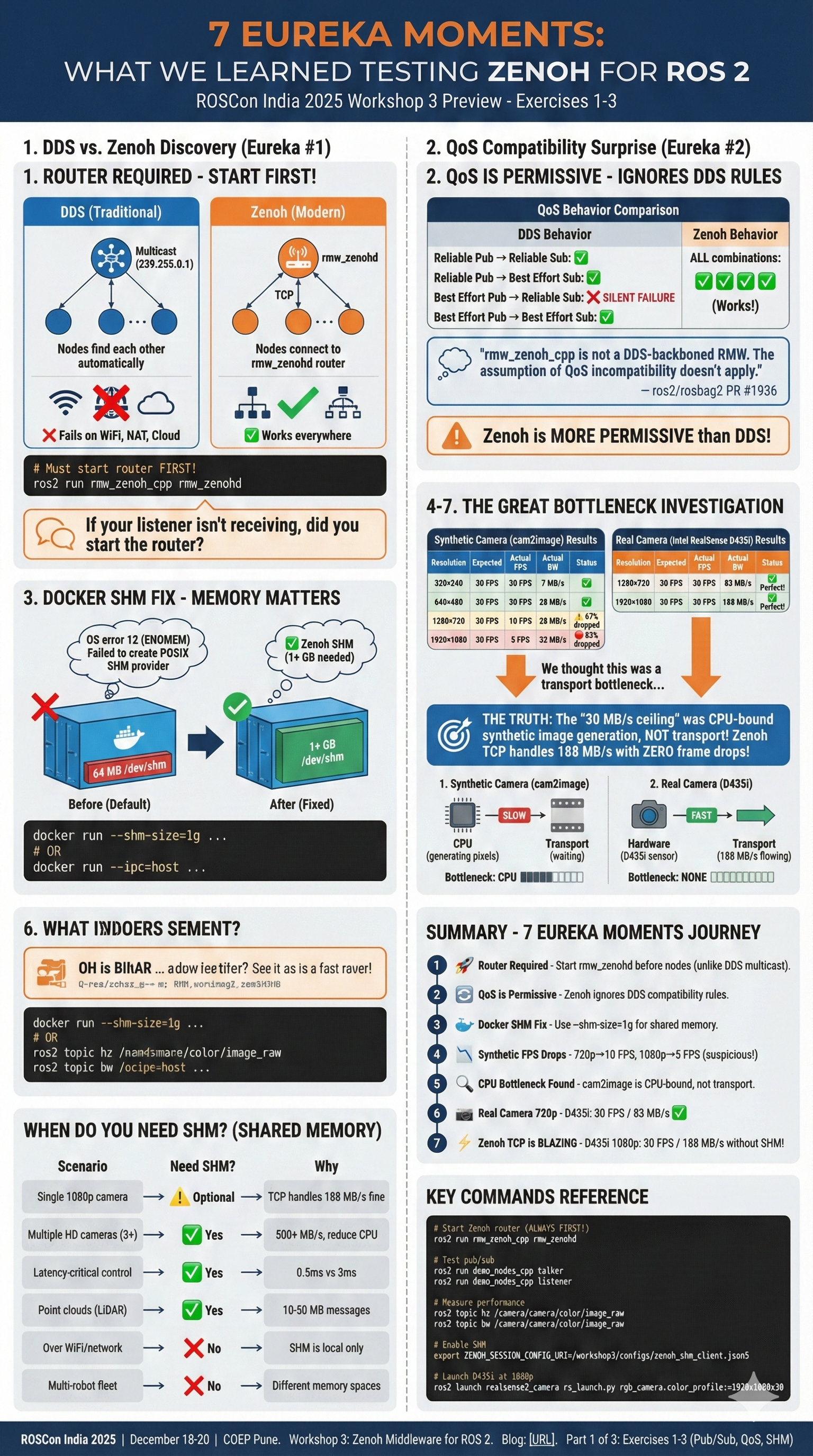
Exercise 1: Core Pub/Sub & Discovery
What You’ll Learn
The foundation of any middleware is how nodes find each other and exchange messages. Exercise 1 explores how Zenoh handles this differently from DDS.
DDS vs Zenoh Discovery
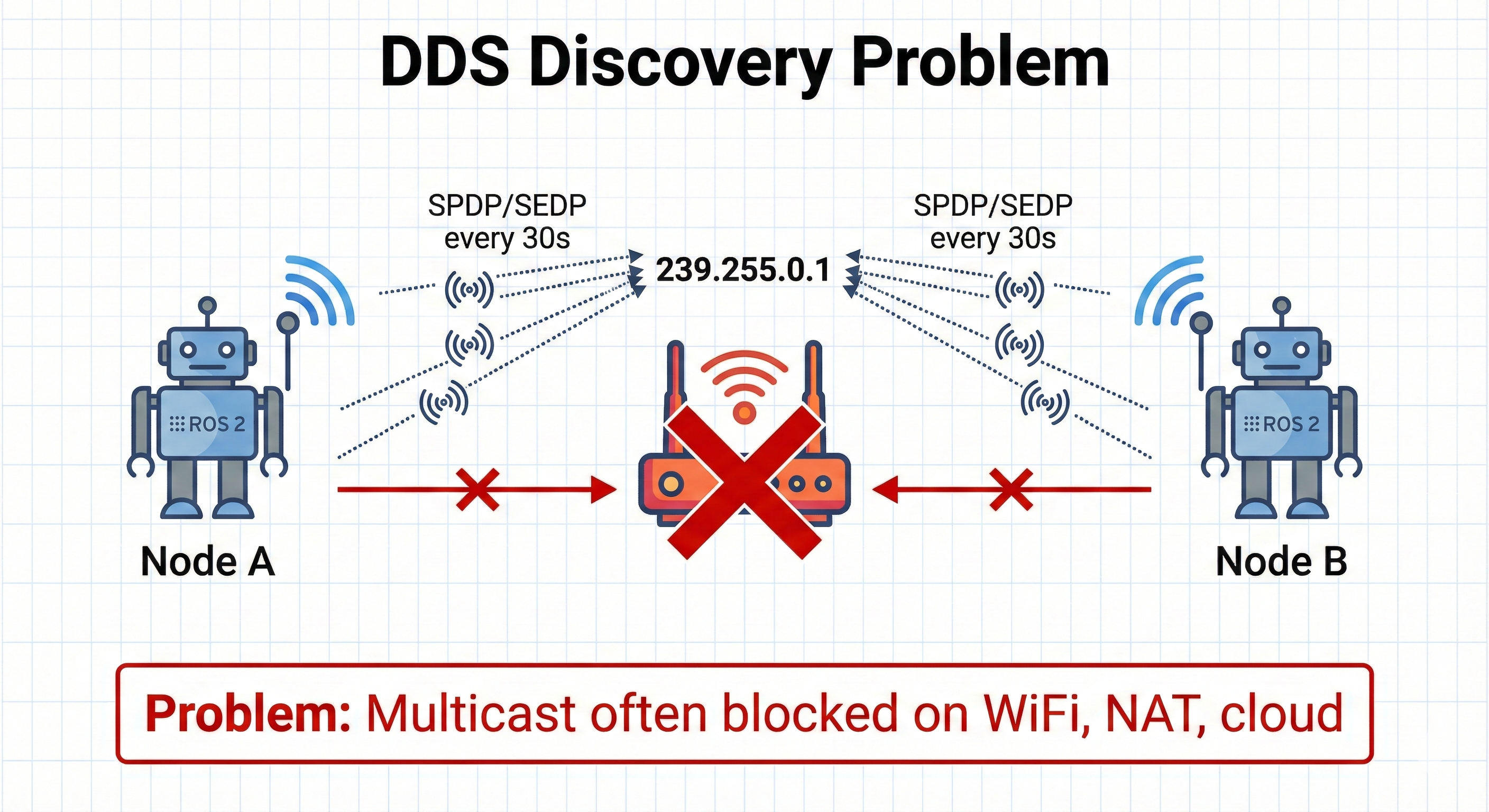
┌─────────────────────────────────────────────────────────────────────────┐
│                        DDS DISCOVERY                                     │
│                                                                          │
│    Node A                              Node B                            │
│    ┌─────┐                             ┌─────┐                           │
│    │     │ ◄──── Multicast ────────►   │     │                           │
│    │ DDS │      (239.255.0.1)          │ DDS │                           │
│    │     │ ◄──── SPDP/SEDP ────────►   │     │                           │
│    └─────┘      (every 30s)            └─────┘                           │
│                                                                          │
│    Problem: Multicast often blocked on WiFi, NAT, cloud                 │
└─────────────────────────────────────────────────────────────────────────┘

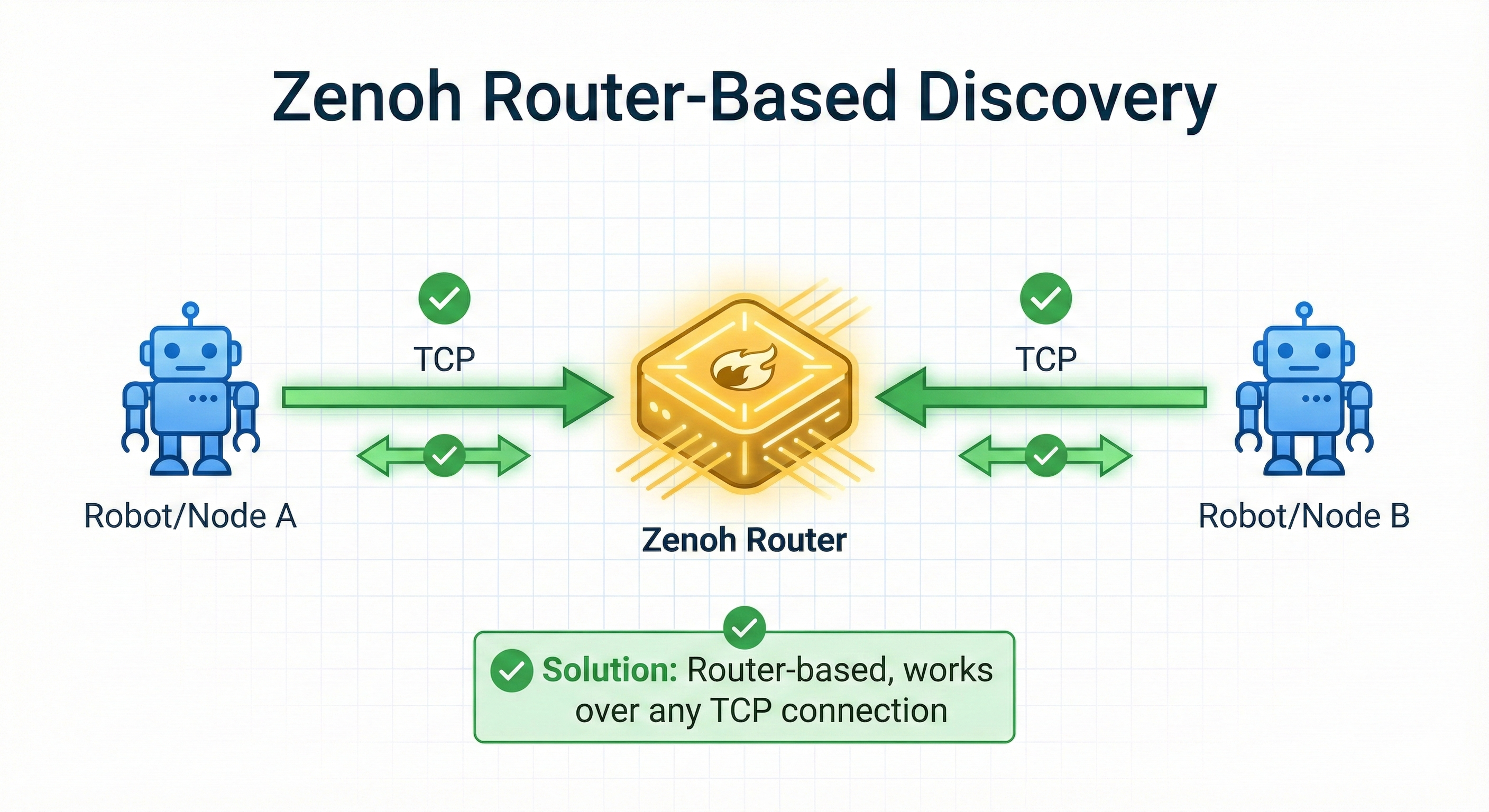
┌─────────────────────────────────────────────────────────────────────────┐
│                       ZENOH DISCOVERY                                    │
│                                                                          │
│    Node A           Router            Node B                             │
│    ┌─────┐         ┌──────┐          ┌─────┐                            │
│    │     │ ──TCP──►│zenohd│◄──TCP─── │     │                            │
│    │Zenoh│         │      │          │Zenoh│                            │
│    │     │◄────────│      │─────────►│     │                            │
│    └─────┘         └──────┘          └─────┘                            │
│                                                                          │
│    Solution: Router-based, works over any TCP connection                │
└─────────────────────────────────────────────────────────────────────────┘
🎯 The Eureka Moment: “Why Isn’t My Listener Receiving?”
If you’re coming from DDS and try this:
# Terminal 1
ros2 run demo_nodes_cpp talker

# Terminal 2
ros2 run demo_nodes_cpp listener
You’ll see this warning and nothing happens:
zenoh::net::runtime::orchestrator: Scouting delay elapsed before start conditions are met.
[WARN] [rmw_zenoh_cpp]: Unable to connect to a Zenoh router.
Have you started a router with `ros2 run rmw_zenoh_cpp rmw_zenohd`?DDS nodes find each other automatically via multicast. Zenoh nodes need a router to broker discovery. This isn’t a limitation - it’s a feature that enables Zenoh to work across NAT, WiFi, and cloud where multicast fails!
The Correct Pattern: Router First!
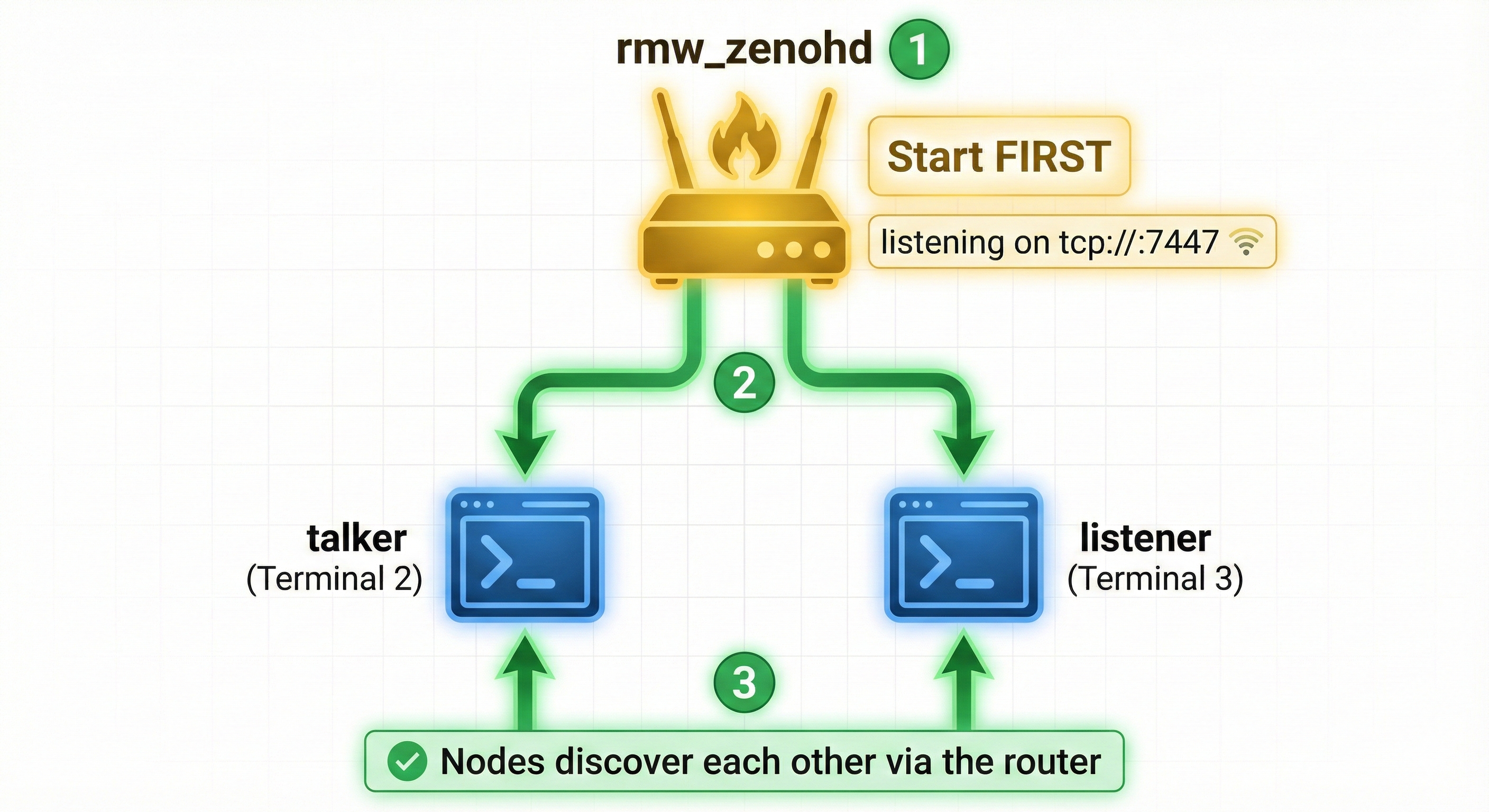
┌─────────────────────────────────────────────────────────────┐
│                   ZENOH STARTUP SEQUENCE                     │
│                                                              │
│   Step 1: Start the Router (Terminal 1)                     │
│         ┌──────────────┐                                    │
│         │ rmw_zenohd   │  ← Must start FIRST               │
│         │ listening on │                                    │
│         │ tcp://:7447  │                                    │
│         └──────┬───────┘                                    │
│                │                                             │
│   Step 2: Nodes connect to router                           │
│       ┌────────┴────────┐                                   │
│       │                 │                                    │
│       ▼                 ▼                                    │
│   ┌───────┐        ┌────────┐                               │
│   │talker │        │listener│                               │
│   │Term 2 │        │Term 3  │                               │
│   └───────┘        └────────┘                               │
│                                                              │
│   Now they discover each other via the router!              │
└─────────────────────────────────────────────────────────────┘
Hands-On Commands
# Terminal 1: Start the Zenoh router FIRST
ros2 run rmw_zenoh_cpp rmw_zenohd

# Terminal 2: Start publisher (connects to router)
ros2 run demo_nodes_cpp talker

# Terminal 3: Start subscriber (connects to router, discovers talker)
ros2 run demo_nodes_cpp listener
# Now you'll see: "I heard: [Hello World: 1]"# Scout for running routers
zenoh scout
# Or check if rmw_zenohd is running
pgrep -a zenohWhy This Design is Actually Better
| Scenario | DDS (Multicast) | Zenoh (Router) |
|---|---|---|
| Same LAN | ✅ Works | ✅ Works |
| WiFi (multicast often blocked) | ❌ Fails | ✅ Works |
| Across subnets | ❌ Fails | ✅ Works |
| Through NAT/firewall | ❌ Fails | ✅ Works |
| Cloud deployment | ❌ Fails | ✅ Works |
The router pattern is what enables Exercises 4-8 (remote connectivity, cloud routers, NAT traversal).
Zenoh Configuration Files
This section covers official Zenoh configuration file locations presented at Workshop 3.
Zenoh’s behavior is controlled by configuration files. The default configurations are installed with rmw_zenoh_cpp:
# Default configuration file location
/opt/ros/$ROS_DISTRO/share/rmw_zenoh_cpp/config/

# Two key files:
DEFAULT_RMW_ZENOH_ROUTER_CONFIG.json5   # For the Zenoh router (rmw_zenohd)
DEFAULT_RMW_ZENOH_SESSION_CONFIG.json5  # For all ROS 2 nodes
Router Configuration (DEFAULT_RMW_ZENOH_ROUTER_CONFIG.json5):
{
  mode: "router",
  listen: {
    endpoints: ["tcp/[::]:7447"]  // Listen on all interfaces, port 7447
  },
  scouting: {
    multicast: {
      enabled: true,
      address: "224.0.0.224:7446"
    }
  }
}
Session Configuration (DEFAULT_RMW_ZENOH_SESSION_CONFIG.json5):
{
  mode: "client",
  connect: {
    endpoints: ["tcp/localhost:7447"]  // Connect to local router
  },
  scouting: {
    multicast: { enabled: true },
    gossip: { enabled: true }
  }
}You can specify custom configurations using environment variables:
# For the router
export ZENOH_ROUTER_CONFIG_URI=/path/to/custom_router_config.json5
ros2 run rmw_zenoh_cpp rmw_zenohd

# For ROS 2 nodes
export ZENOH_SESSION_CONFIG_URI=/path/to/custom_session_config.json5
ros2 run demo_nodes_cpp talker
Connecting to a Remote Robot
This section covers how to connect your workstation to a robot running Zenoh.
When your robot is running rmw_zenohd on a different machine, you need to configure your nodes to connect to it. The simplest method uses ZENOH_CONFIG_OVERRIDE:
# Configure your node to connect to robot's Zenoh router
export ZENOH_CONFIG_OVERRIDE='connect/endpoints=["tcp/192.168.1.2:7447"]'

# Start the router on your workstation (connects to robot)
ros2 run rmw_zenoh_cpp rmw_zenohd

# Your ROS 2 nodes now communicate with the robot!
ros2 topic list # Shows robot's topics┌─────────────────────────────────────────────────────────────────────────┐
│ CONNECT TO ROBOT │
│ │
│ Your Workstation Robot (192.168.1.2) │
│ ──────────────── ────────────────── │
│ │
│ ┌──────────────┐ ┌──────────────┐ │
│ │ rmw_zenohd │───── TCP connection ────►│ rmw_zenohd │ │
│ │ (client) │ :7447 │ (router) │ │
│ └──────┬───────┘ └──────┬───────┘ │
│ │ │ │
│ ┌──────┴───────┐ ┌──────┴───────┐ │
│ │ rviz2 │ │ camera_node │ │
│ │ teleop │◄─────── topics ─────────►│ lidar_node │ │
│ │ rqt │ │ odom_node │ │
│ └──────────────┘ └──────────────┘ │
│ │
│ ZENOH_CONFIG_OVERRIDE='connect/endpoints=["tcp/192.168.1.2:7447"]' │
└─────────────────────────────────────────────────────────────────────────┘Connect Just 1 Node (No Local Router Needed!):
You can also connect a single node directly to the robot without running a local router:
# No need for local rmw_zenohd - node connects directly!
export ZENOH_CONFIG_OVERRIDE='connect/endpoints=["tcp/192.168.1.2:7447"]'
ros2 run rviz2 rviz2
This is useful when you just want to visualize or teleop without setting up a full local infrastructure.
Router Discovery via UDP Multicast
This section explains how Zenoh routers automatically discover each other.
On a local network, Zenoh routers can automatically discover each other using UDP multicast - no manual configuration needed!
How It Works:
- Gossip Protocol: Routers use a gossip protocol for node interconnections
- UDP Multicast Scouting: Routers broadcast their presence on
224.0.0.224:7446 - Auto-Connect: When routers discover each other, they automatically form a mesh
The Gossip Protocol (also called “epidemic protocol”) is inspired by how rumors spread in social networks. It’s a decentralized way for nodes to share information without a central coordinator.
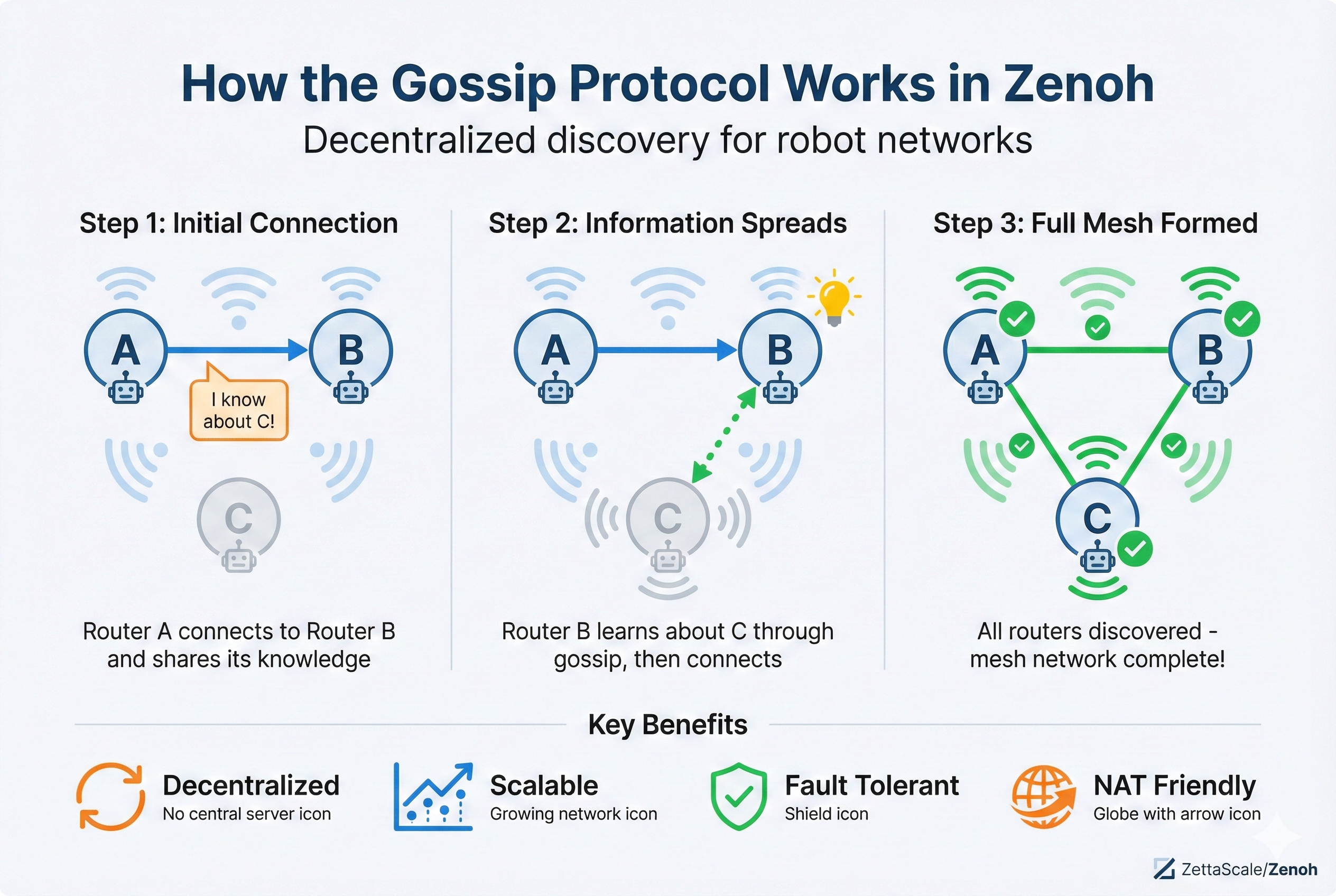
How Gossip Works in Zenoh (ASCII Diagram):
┌─────────────────────────────────────────────────────────────────────────┐
│                    GOSSIP PROTOCOL IN ACTION                            │
│                                                                          │
│   Step 1: Router A connects to Router B                                 │
│   ┌─────┐         ┌─────┐                                               │
│   │  A  │────────►│  B  │     A tells B: "I know about router C"       │
│   └─────┘         └─────┘                                               │
│                                                                          │
│   Step 2: Router B now knows about C (even without direct connection)   │
│   ┌─────┐         ┌─────┐         ┌─────┐                               │
│   │  A  │────────►│  B  │ · · · · │  C  │   B can now connect to C!    │
│   └─────┘         └─────┘         └─────┘                               │
│                                                                          │
│   Step 3: Information spreads exponentially                             │
│   ┌─────┐         ┌─────┐         ┌─────┐                               │
│   │  A  │◄───────►│  B  │◄───────►│  C  │   Full mesh formed!          │
│   └──┬──┘         └─────┘         └──┬──┘                               │
│      │                               │                                   │
│      └───────────────────────────────┘                                  │
└─────────────────────────────────────────────────────────────────────────┘
Key Properties:
| Property | Description |
|---|---|
| Decentralized | No central server needed - each node shares what it knows |
| Scalable | Information spreads in O(log N) rounds for N nodes |
| Fault-tolerant | Works even if some nodes fail - no single point of failure |
| Eventually consistent | All nodes eventually learn about all other nodes |
Why Zenoh Uses Gossip:
- Works without multicast - Gossip works over unicast TCP connections
- NAT-friendly - Only needs outbound connections
- Self-healing - Network topology updates automatically as routers join/leave
- Efficient - Each router only needs to know a few peers, gossip spreads the rest
Gossip vs Multicast:
| Aspect | UDP Multicast | Gossip Protocol |
|---|---|---|
| Network | Same subnet only | Works across subnets |
| NAT | Blocked by NAT | Works through NAT |
| Speed | Instant discovery | Gradual (seconds) |
| Reliability | Can lose packets | Reliable (retries) |
| WiFi | Often blocked | Always works |
Configuration:
scouting: {
  multicast: { enabled: true },   // Fast local discovery
  gossip: { enabled: true }       // Cross-network discovery
}
Best Practice: Enable BOTH multicast (for fast local discovery) and gossip (for reliability and cross-network discovery).
Enable Router Discovery via Config File:
// zenoh_router_discovery.json5
{
  mode: "router",
  scouting: {
    multicast: {
      enabled: true,
      address: "224.0.0.224:7446",
      autoconnect: { router: "true" }  // Auto-connect to discovered routers
    }
  }
}
# Use the config
export ZENOH_ROUTER_CONFIG_URI=/path/to/zenoh_router_discovery.json5
ros2 run rmw_zenoh_cpp rmw_zenohdEnable Router Discovery via Environment Variable:
# Quick inline override without a config file
export ZENOH_CONFIG_OVERRIDE='scouting/multicast/enabled=true;scouting/multicast/autoconnect=["router"]'
ros2 run rmw_zenoh_cpp rmw_zenohdUDP multicast often doesn’t work on: - WiFi networks (many access points block multicast) - Cloud/VPN (different subnets) - Docker (without --net=host)
In these cases, use explicit connect/endpoints configuration instead.
Key Takeaways
- DDS uses multicast for peer-to-peer discovery (fast on LAN, problematic elsewhere)
- Zenoh uses TCP connections to routers (works everywhere, including WiFi and cloud)
- The
rt/prefix maps ROS 2 topics to Zenoh key expressions
Exercise 2: Quality of Service (QoS)
What You’ll Learn
QoS profiles determine how messages are delivered. Exercise 2 explores matching QoS between publishers and subscribers.
QoS Parameters Explained
| Parameter | Options | Use Case |
|---|---|---|
| Reliability | RELIABLE / BEST_EFFORT |
Control commands need RELIABLE; sensor streams can use BEST_EFFORT |
| Durability | VOLATILE / TRANSIENT_LOCAL |
TRANSIENT_LOCAL delivers last message to late subscribers |
| History | KEEP_LAST(n) / KEEP_ALL |
How many messages to buffer |
| Deadline | Duration | Alert if messages don’t arrive in time |
| Liveliness | AUTOMATIC / MANUAL |
Node health monitoring |
QoS Compatibility Matrix (DDS Only!)
Publisher Reliability    Subscriber Reliability    Compatible? (DDS)
─────────────────────────────────────────────────────────────────────
RELIABLE                 RELIABLE                  ✅ Yes
RELIABLE                 BEST_EFFORT               ✅ Yes
BEST_EFFORT              RELIABLE                  ❌ No (incompatible!)
BEST_EFFORT BEST_EFFORT ✅ YesWith DDS middleware, a RELIABLE subscriber cannot receive from a BEST_EFFORT publisher. ROS 2 silently drops the connection - no error message!
Use ros2 topic info -v /topic_name to check QoS compatibility.
🎯 Eureka Moment #2: Zenoh Doesn’t Enforce QoS Incompatibility!
Here’s what happens when you actually test this with rmw_zenoh_cpp:
# Terminal 2: Best Effort Publisher
ros2 topic pub /qos_test std_msgs/msg/String "{data: 'best effort msg'}" \
    --qos-reliability best_effort --rate 1

# Terminal 3: Reliable Subscriber (should fail with DDS...)
ros2 topic echo /qos_test --qos-reliability reliable
# Result: Messages ARE received! 🤯
Wait, the matrix said this should fail!
The QoS compatibility matrix above applies to DDS-based middleware only (CycloneDDS, FastDDS).
Zenoh (rmw_zenoh_cpp) is not a DDS implementation - it’s a completely different protocol that doesn’t enforce DDS-style QoS incompatibility.
From ros2/rosbag2 PR #1936: > “rmw_zenoh_cpp is not a DDS-backboned RMW. The assumption of QoS incompatibility of reliability doesn’t mean the subscriber receives no message.”
DDS vs Zenoh QoS Behavior
| Scenario | DDS (CycloneDDS/FastDDS) | Zenoh (rmw_zenoh_cpp) |
|---|---|---|
| Reliable Pub → Reliable Sub | ✅ Works | ✅ Works |
| Reliable Pub → Best Effort Sub | ✅ Works | ✅ Works |
| Best Effort Pub → Reliable Sub | ❌ Silent failure | ✅ Works! |
| Best Effort Pub → Best Effort Sub | ✅ Works | ✅ Works |
Why This Matters
When you switch from DDS to Zenoh:
- Old debugging assumptions may not apply - “QoS mismatch” isn’t why your subscriber isn’t receiving
- Zenoh is more permissive - it delivers what it can rather than refusing to connect
- Test your assumptions - behavior you learned with DDS may not transfer to Zenoh
Hands-On Commands
# Check QoS of a topic
ros2 topic info -v /chatter

# Test with DDS (switch middleware temporarily)
export RMW_IMPLEMENTATION=rmw_cyclonedds_cpp
ros2 daemon stop && ros2 daemon start
# Now test the incompatible QoS - you'll see the failure

# Switch back to Zenoh
export RMW_IMPLEMENTATION=rmw_zenoh_cpp
ros2 daemon stop && ros2 daemon start
# Same test - now it works!
Zenoh QoS Mapping
While Zenoh doesn’t enforce compatibility, it still respects QoS intentions:
| ROS 2 QoS | Zenoh Behavior |
|---|---|
RELIABLE |
Zenoh reliable channel (retries on failure) |
BEST_EFFORT |
Zenoh best-effort channel (no retries) |
TRANSIENT_LOCAL |
Zenoh queryable + cache (late joiners get last value) |
Exercise 3: Shared Memory (SHM) Transport
What You’ll Learn
For high-bandwidth local communication, copying data through the network stack is wasteful. Shared memory allows zero-copy message passing.
Why Shared Memory?
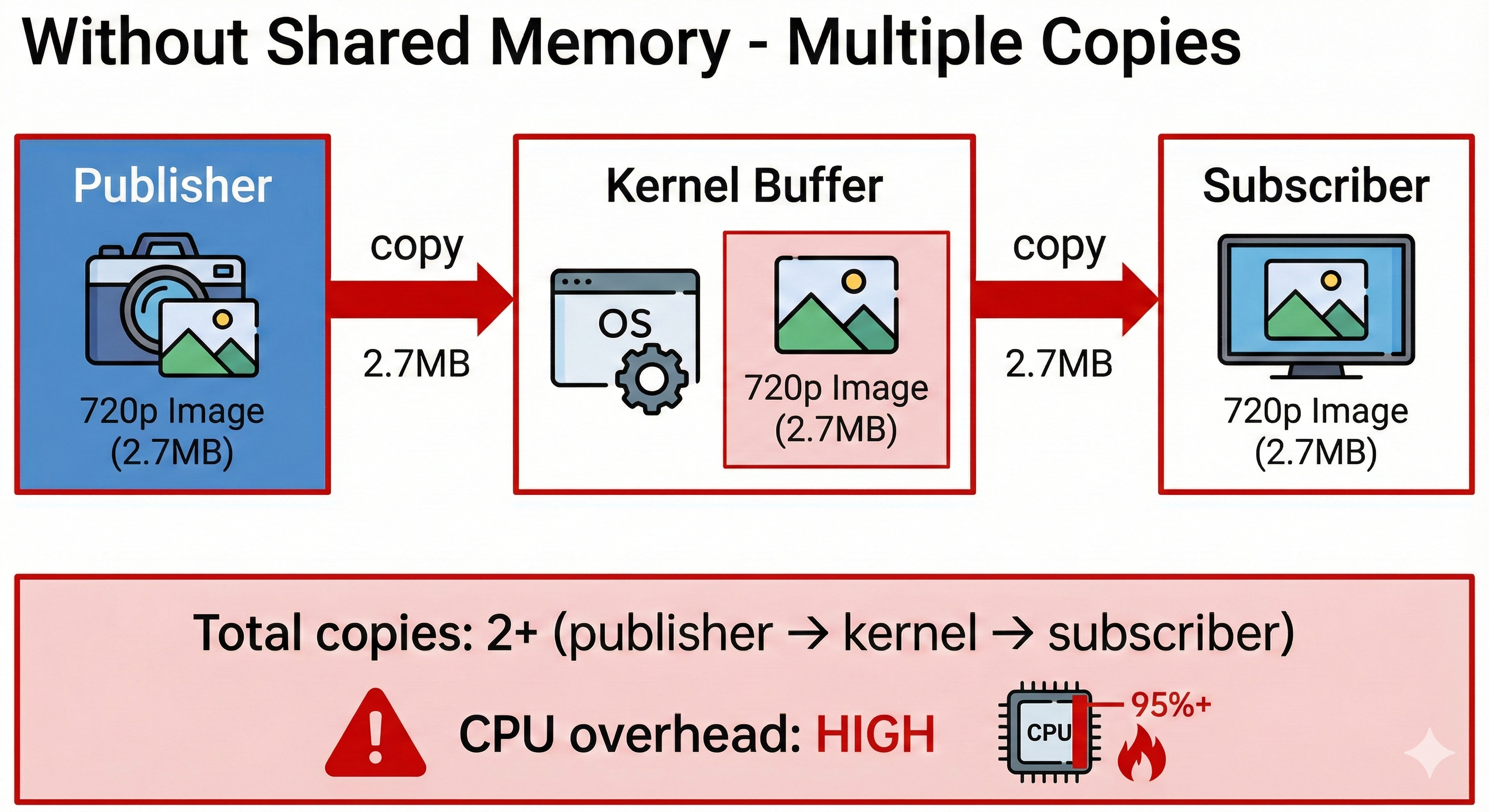
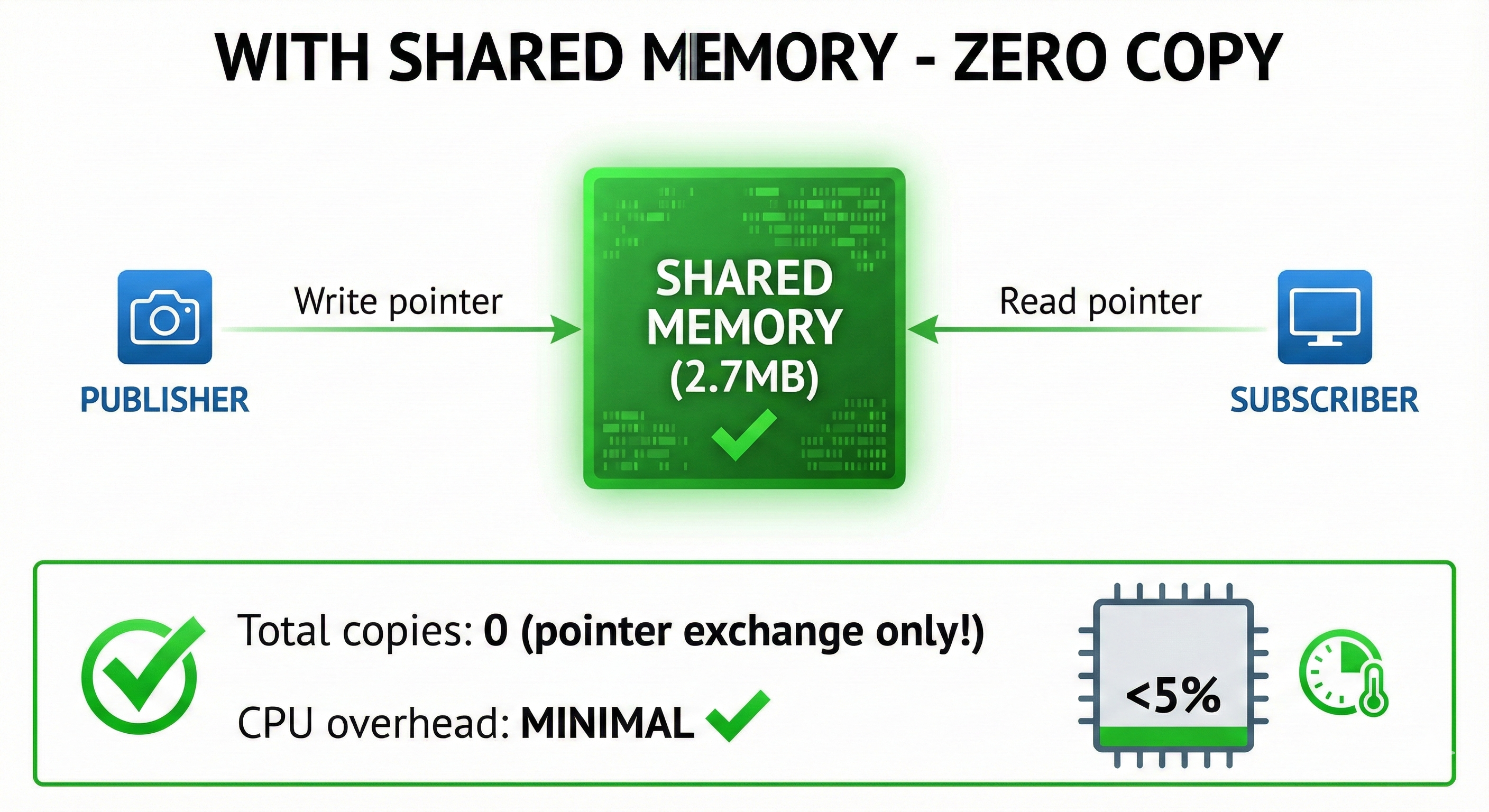
┌─────────────────────────────────────────────────────────────────────────┐
│                    WITHOUT SHARED MEMORY                                 │
│                                                                          │
│    Publisher           Network Stack          Subscriber                 │
│    ┌─────────┐        ┌───────────┐         ┌─────────┐                 │
│    │ 720p    │──copy──│  Kernel   │──copy───│ 720p    │                 │
│    │ Image   │        │  Buffer   │         │ Image   │                 │
│    │ (2.7MB) │        │           │         │ (2.7MB) │                 │
│    └─────────┘        └───────────┘         └─────────┘                 │
│                                                                          │
│    Total copies: 2+ (publisher→kernel→subscriber)                       │
│    CPU overhead: HIGH for large messages                                 │
└─────────────────────────────────────────────────────────────────────────┘

┌─────────────────────────────────────────────────────────────────────────┐
│                    WITH SHARED MEMORY                                    │
│                                                                          │
│    Publisher                                 Subscriber                  │
│    ┌─────────┐        ┌───────────┐         ┌─────────┐                 │
│    │ Write   │───────►│  Shared   │◄────────│ Read    │                 │
│    │ pointer │        │  Memory   │         │ pointer │                 │
│    │         │        │  (2.7MB)  │         │         │                 │
│    └─────────┘        └───────────┘         └─────────┘                 │
│                                                                          │
│    Total copies: 0 (pointer exchange only!)                             │
│    CPU overhead: MINIMAL                                                 │
└─────────────────────────────────────────────────────────────────────────┘
Real Camera Test: Measuring Bandwidth
Let’s see real numbers using the image_tools package:
# Terminal 1: Zenoh router
ros2 run rmw_zenoh_cpp rmw_zenohd

# Terminal 2: Synthetic camera at 30 FPS
ros2 run image_tools cam2image --ros-args -p frequency:=30.0

# Terminal 3: Measure bandwidth
ros2 topic bw /image
Actual results from testing:
# 320×240 (default)
$ ros2 topic hz /image
average rate: 29.633
    min: 0.030s max: 0.039s std dev: 0.00223s window: 181

$ ros2 topic bw /image
7.02 MB/s from 30 messages
    Message size mean: 0.23 MB min: 0.23 MB max: 0.23 MB
# 640×480 (VGA) - 4x more data!
$ ros2 run image_tools cam2image --ros-args -p frequency:=30.0 -p width:=640 -p height:=480
$ ros2 topic bw /image
27.55 MB/s from 100 messages
Message size mean: 0.92 MB min: 0.92 MB max: 0.92 MB# 1280×720 (720p) - What happens at real camera resolution?
$ ros2 run image_tools cam2image --ros-args -p frequency:=30.0 -p width:=1280 -p height:=720
$ ros2 topic bw /image
27.37 MB/s from 49 messages
Message size mean: 2.76 MB min: 2.76 MB max: 2.76 MB
$ ros2 topic hz /image
average rate: 9.878 # ⚠️ Only 10 FPS instead of 30!# 1920×1080 (1080p) - Full HD, the worst case
$ ros2 run image_tools cam2image --ros-args -p frequency:=30.0 -p width:=1920 -p height:=1080
$ ros2 topic bw /image
31.89 MB/s from 20 messages
Message size mean: 6.22 MB min: 6.22 MB max: 6.22 MB
$ ros2 topic hz /image
average rate: 4.977 # ⚠️ Only 5 FPS - missing 83% of frames!🎯 Eureka Moment #4: Understanding the Real Bottleneck
As resolution increases, the frame rate collapses:
| Resolution | Requested FPS | Actual FPS | Bandwidth | Status |
|---|---|---|---|---|
| 320×240 | 30 | 29.6 | 7 MB/s | ✅ Full speed |
| 640×480 | 30 | 29.6 | 28 MB/s | ✅ Full speed |
| 1280×720 | 30 | 9.9 | 28 MB/s | ⚠️ 10 FPS only |
| 1920×1080 | 30 | 5.0 | 32 MB/s | 🔴 5 FPS only |
But wait - is this a transport bottleneck or something else?
🎯 Eureka Moment #5: SHM Test Reveals the Truth!
We enabled SHM (--shm-size=1g in Docker) and tested again:
# Verify SHM is active
$ ls -la /dev/shm/ | grep zenoh
-rw------- 1 root root 50331648 Dec 15 22:03 573902227.zenoh  # 50MB SHM segment!
-rw------- 1 root root  1310720 Dec 15 22:03 5813.zenoh

# Test 720p with SHM enabled
$ ros2 topic hz /image
average rate: 9.883  # Still 10 FPS! 🤔
SHM files exist, but FPS didn’t improve! This means:
The bottleneck is NOT transport - it’s cam2image being CPU-bound generating synthetic pixels!
| Resolution | Without SHM | With SHM | Bottleneck |
|---|---|---|---|
| 720p | 10 FPS | 10 FPS | CPU (image generation) |
| 1080p | 5 FPS | 5 FPS | CPU (image generation) |
cam2image creates synthetic images by computing pixel values. At 1080p, generating 6.2 million pixels per frame is CPU-intensive - the transport isn’t even the limiting factor!
Why This Matters for Real Robots
With synthetic data (cam2image), the CPU generates frames slowly.
With real cameras (D435i, webcam), the hardware generates frames at full speed:
Synthetic (cam2image):   CPU → slow frame generation → transport doesn't matter
Real camera (D435i): Hardware → fast 30 FPS → transport becomes bottleneck!- ✅ Real cameras (hardware generates frames fast)
- ✅ Pre-recorded rosbags (data already exists)
- ✅ GPU-accelerated pipelines (CUDA generates frames fast)
- ❌ Synthetic CPU generators (CPU is the bottleneck, not transport)
Testing with Real Cameras (D435i / Webcam)
To test with real hardware instead of synthetic data, your Docker setup needs:
1. Docker Image Requirements:
The workshop3-jazzy-zenoh image includes these camera packages:
ros-jazzy-realsense2-camera     # Intel RealSense D435i support
ros-jazzy-realsense2-description # URDF models
ros-jazzy-v4l2-camera           # USB webcam support
ros-jazzy-image-tools           # cam2image, showimage
ros-jazzy-image-transport       # Compressed transport
2. Container Launch Requirements:
Your docker run command needs these flags:
docker run -it --rm \
    --privileged \
    --shm-size=1g \        # Required for SHM testing
    -v /dev:/dev \         # Required for camera access
    ...
3. Launch RealSense D435i:
# Inside container
ros2 launch realsense2_camera rs_launch.py

# Check bandwidth (real hardware = real 30 FPS!)
ros2 topic bw /camera/camera/color/image_raw
ros2 topic hz /camera/camera/color/image_rawIf you’re following this blog to prepare for the workshop, make sure your Docker image has these packages pre-installed. There’s no reliable WiFi at the workshop for apt install!
🎯 Eureka Moment #6: Real D435i Proves Transport ISN’T the Bottleneck!
Here’s the definitive proof that our earlier FPS drops were CPU-bound, not transport-bound:
# Terminal 1: Zenoh router
ros2 run rmw_zenoh_cpp rmw_zenohd

# Terminal 2: Launch D435i camera (720p @ 30 FPS)
ros2 launch realsense2_camera rs_launch.py

# Terminal 3: Measure performance
ros2 topic bw /camera/camera/color/image_raw
ros2 topic hz /camera/camera/color/image_raw
Actual results with Intel RealSense D435i:
$ ros2 topic bw /camera/camera/color/image_raw
Subscribed to [/camera/camera/color/image_raw]
83.04 MB/s from 30 messages
    Message size mean: 2.76 MB min: 2.76 MB max: 2.76 MB
$ ros2 topic hz /camera/camera/color/image_raw
average rate: 29.998
min: 0.027s max: 0.040s std dev: 0.00206s window: 181| Source | Resolution | FPS | Bandwidth | Bottleneck |
|---|---|---|---|---|
cam2image (synthetic) |
720p | 10 FPS | 28 MB/s | CPU generating pixels |
cam2image (synthetic) |
1080p | 5 FPS | 32 MB/s | CPU generating pixels |
| D435i (real camera) | 720p | 30 FPS | 83 MB/s | None! |
Real cameras output frames at hardware speed. The transport handles 83 MB/s easily - nearly 3x what we saw with synthetic data!
Comparison: Synthetic vs Real Camera
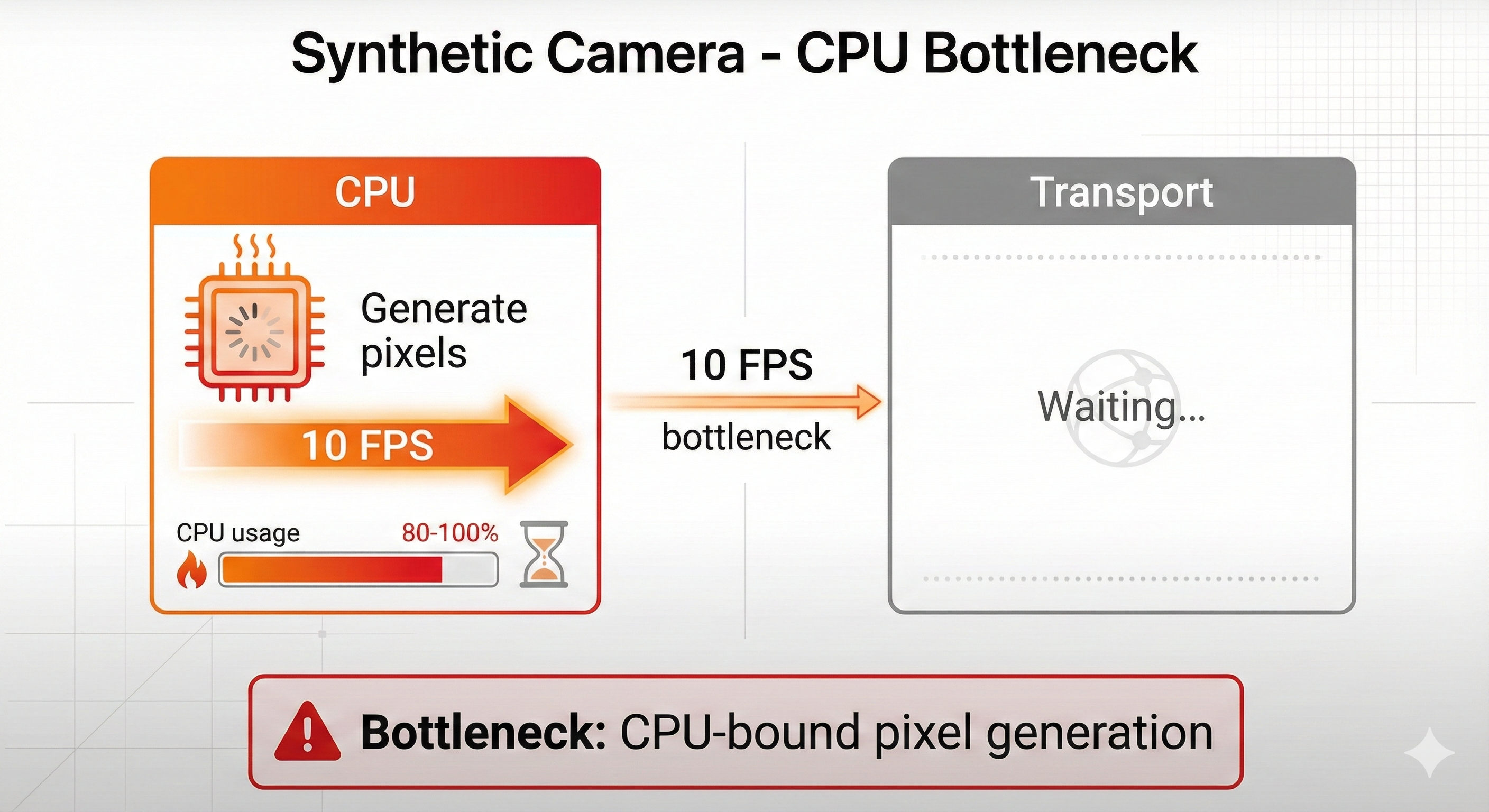
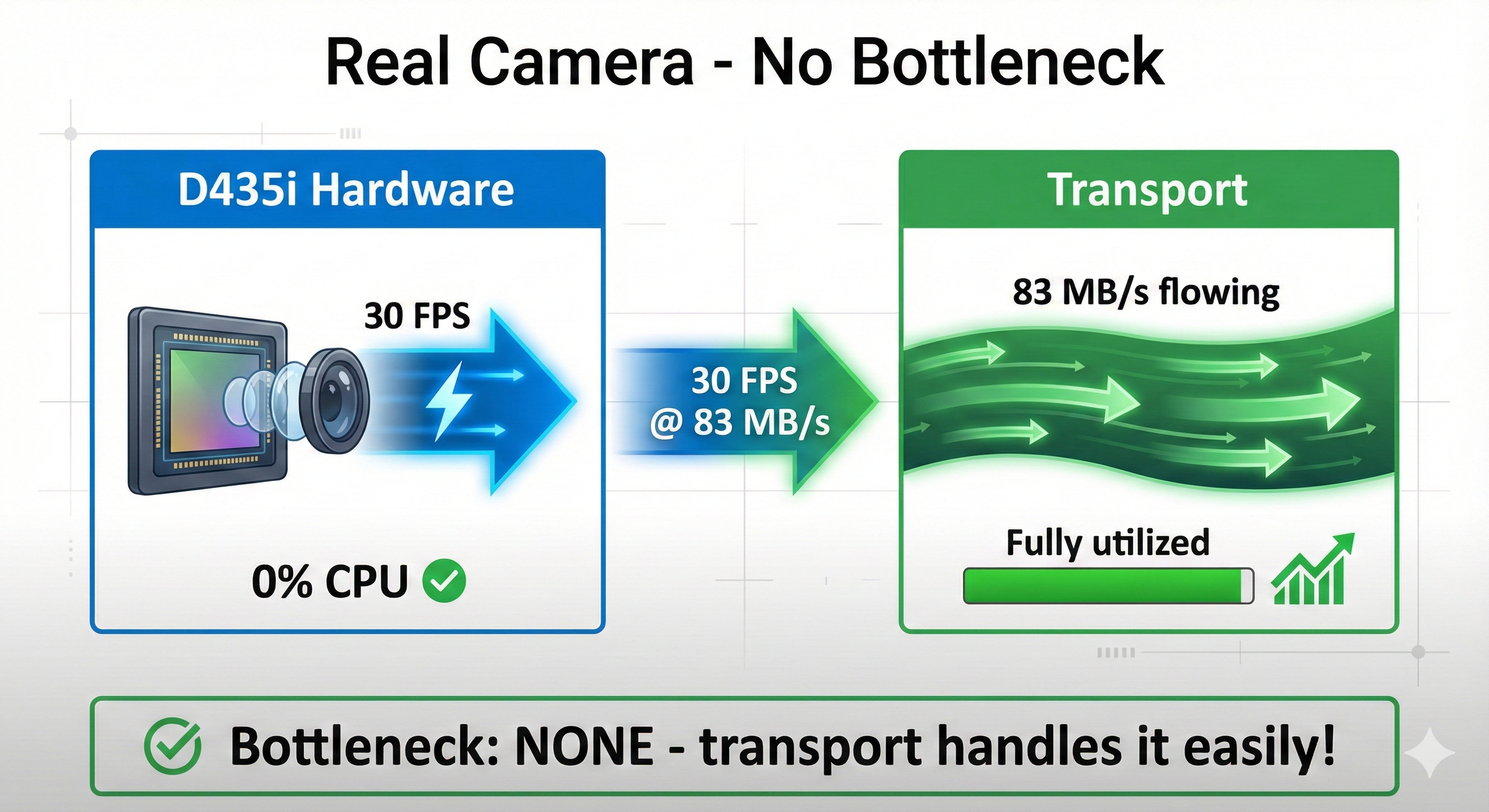
┌─────────────────────────────────────────────────────────────────────────┐
│                    SYNTHETIC CAMERA (cam2image)                          │
│                                                                          │
│    CPU                                Transport                          │
│    ┌─────────┐                       ┌───────────┐                       │
│    │ Generate│  10 FPS               │           │                       │
│    │ pixels  │────────slow!──────────│  Waiting  │                       │
│    │ (CPU %) │       ⌛               │           │                       │
│    └─────────┘                       └───────────┘                       │
│                                                                          │
│    Bottleneck: CPU-bound pixel generation                               │
└─────────────────────────────────────────────────────────────────────────┘

┌─────────────────────────────────────────────────────────────────────────┐
│                    REAL CAMERA (D435i)                                   │
│                                                                          │
│    Hardware                          Transport                           │
│    ┌─────────┐                       ┌───────────┐                       │
│    │ D435i   │  30 FPS               │ 83 MB/s   │                       │
│    │ sensor  │─────────fast!─────────│  flowing  │                       │
│    │ (0% CPU)│       ⚡               │           │                       │
│    └─────────┘                       └───────────┘                       │
│                                                                          │
│    Bottleneck: NONE - transport handles it easily!                      │
└─────────────────────────────────────────────────────────────────────────┘
Testing SHM with Real Cameras
Now that we’ve proven the transport can handle 83 MB/s, let’s enable SHM to see if we can reduce latency and CPU usage:
1. SHM Client Config File:
The key to enabling SHM is a client configuration file that connects to the router:
// /workshop3/configs/zenoh_shm_client.json5
{
  mode: "client",
  connect: {
    endpoints: ["tcp/127.0.0.1:7447"]
  },
  scouting: {
    multicast: { enabled: false },
    gossip: { enabled: true }
  },
  transport: {
    shared_memory: {
      enabled: true
    }
  }
}
2. Launch with SHM Enabled:
# Terminal 1: Zenoh router (runs normally, SHM is client-side)
ros2 run rmw_zenoh_cpp rmw_zenohd

# Terminal 2: Camera with SHM enabled
export ZENOH_SESSION_CONFIG_URI=/workshop3/configs/zenoh_shm_client.json5
ros2 launch realsense2_camera rs_launch.py

# Terminal 3: Subscriber with SHM enabled
export ZENOH_SESSION_CONFIG_URI=/workshop3/configs/zenoh_shm_client.json5
ros2 topic hz /camera/camera/color/image_raw
3. Verify SHM is Active:
# Check for Zenoh SHM segments in /dev/shm
ls -la /dev/shm/ | grep zenoh
# Should show files like: 573902227.zenoh (50MB segments)

# Verify container has enough SHM
df -h /dev/shm
# Should show: 1.0G (if you used --shm-size=1g)With SHM enabled, image data is passed via shared memory pointers instead of being copied through the network stack. This reduces: - Latency: No serialization/deserialization overhead - CPU usage: No data copying - Memory: Single copy shared between publisher and subscriber
🎯 Eureka Moment #7: Zenoh TCP Handles 188 MB/s - No SHM Needed!
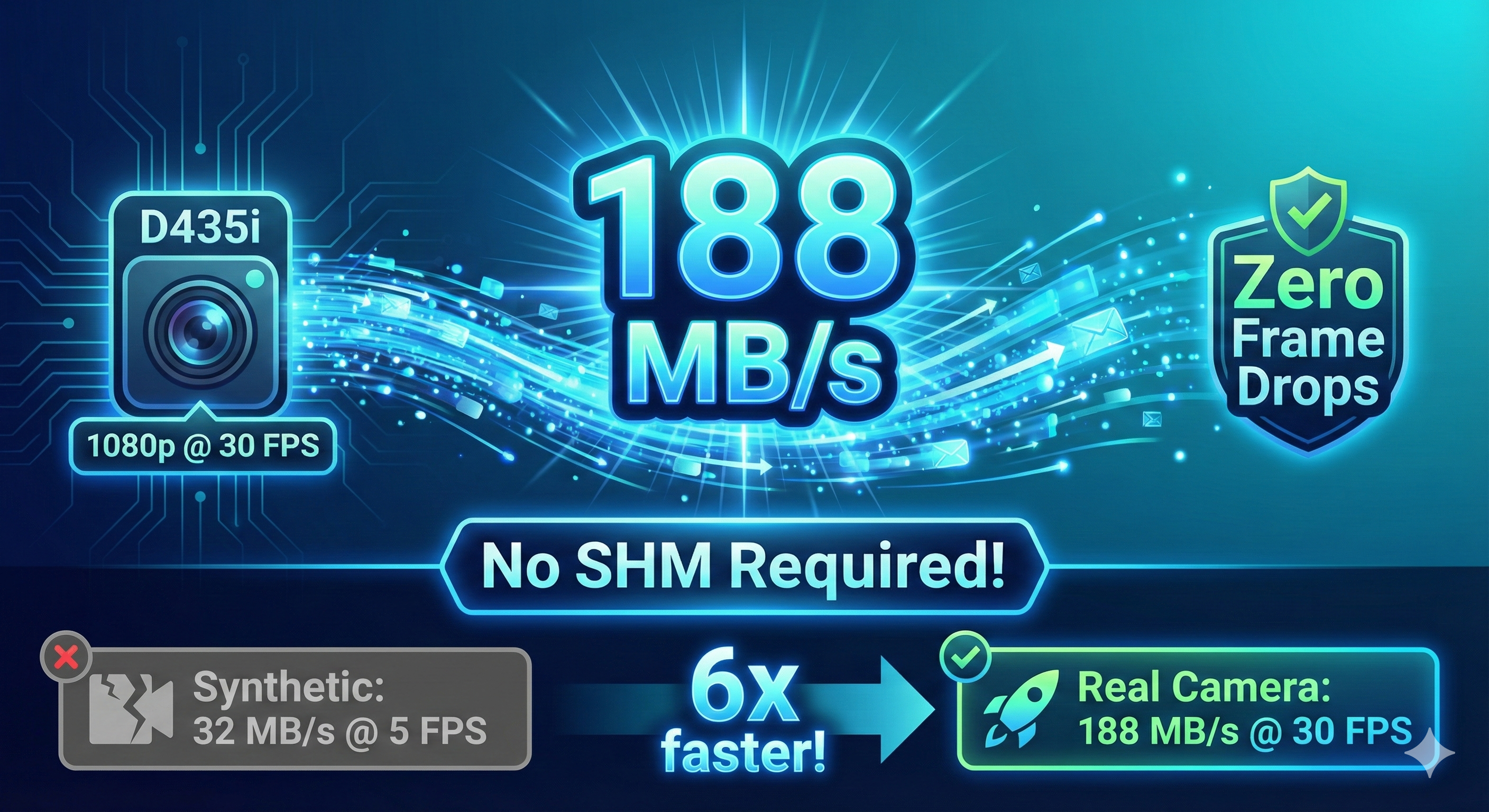
We pushed the D435i to 1080p @ 30 FPS to stress-test the transport:
# Launch D435i at Full HD
ros2 launch realsense2_camera rs_launch.py rgb_camera.color_profile:=1920x1080x30

# Measure bandwidth
ros2 topic bw /camera/camera/color/image_raw
Results at 1080p (6.22 MB per frame):
| Configuration | Bandwidth | FPS | Frames Dropped |
|---|---|---|---|
| Without SHM | 187 MB/s | 30 FPS | NONE! |
| With SHM | 188 MB/s | 30 FPS | NONE! |
Remember the “30 MB/s ceiling” we saw with synthetic data? That was NEVER a transport limitation!
Synthetic (cam2image):     32 MB/s @ 5 FPS   ← CPU-bound generation
Real camera (D435i 1080p): 188 MB/s @ 30 FPS ← Transport handles 6x more!
Zenoh’s TCP transport handles 188 MB/s with zero frame drops - even WITHOUT SHM!
So When DO You Actually Need SHM?
If Zenoh TCP handles 188 MB/s easily, when does SHM matter?
| Scenario | SHM Benefit | Why |
|---|---|---|
| Multiple HD cameras | ✅ Throughput | 3× D435i @ 1080p = 564 MB/s |
| Latency-critical control | ✅ Latency | ~0.5ms vs ~3ms |
| CPU-constrained robots | ✅ CPU savings | Eliminates copy overhead |
| Point clouds | ✅ Both | 10-50 MB messages @ 10+ Hz |
| Single camera streaming | ⚠️ Optional | TCP handles it fine |
Lesson: Know Your Bottleneck!
Before optimizing transport, identify where the bottleneck actually is:
- CPU-bound generation? → Faster CPU or GPU acceleration
- Transport-bound? → SHM for local, compression for remote
- Subscriber-bound? → Faster processing or lower rate
Understanding the Numbers: Synthetic vs Real
Synthetic Camera (cam2image) - CPU-Bound:
| Resolution | Frame Size | Expected | Measured | Bottleneck |
|---|---|---|---|---|
| 320×240 | 0.23 MB | 7 MB/s @ 30 FPS | ✅ 7.02 MB/s @ 30 FPS | None |
| 640×480 | 0.92 MB | 28 MB/s @ 30 FPS | ✅ 27.55 MB/s @ 30 FPS | None |
| 1280×720 | 2.76 MB | 83 MB/s @ 30 FPS | ⚠️ 27.37 MB/s @ 10 FPS | CPU |
| 1920×1080 | 6.22 MB | 186 MB/s @ 30 FPS | 🔴 31.89 MB/s @ 5 FPS | CPU |
Real Camera (D435i) - No Bottleneck:
| Resolution | Frame Size | Expected | Measured | Bottleneck |
|---|---|---|---|---|
| 1280×720 | 2.76 MB | 83 MB/s @ 30 FPS | ✅ 83 MB/s @ 30 FPS | None |
| 1920×1080 | 6.22 MB | 186 MB/s @ 30 FPS | ✅ 188 MB/s @ 30 FPS | None! |
Key insight: The “30 MB/s ceiling” was CPU-bound synthetic image generation, NOT a transport limitation! Real cameras prove Zenoh TCP handles 188 MB/s easily.
When to Use SHM
| Scenario | Use SHM? | Reason |
|---|---|---|
| Single camera (1080p) | ⚠️ Optional | Zenoh TCP handles 188 MB/s fine! |
| Multiple HD cameras | ✅ Yes | 3× cameras = 500+ MB/s, reduces CPU |
| Latency-critical control | ✅ Yes | SHM gives ~0.5ms vs ~3ms latency |
| Point clouds | ✅ Yes | 10-50 MB messages benefit from zero-copy |
| IMU data (local) | ⚠️ Maybe | Small messages, overhead may not be worth it |
| Commands over WiFi | ❌ No | SHM only works on same machine |
| Multi-robot | ❌ No | Different machines = different memory spaces |
| Docker container | ⚠️ Requires config | Need --shm-size or --ipc=host |
Enabling SHM in Zenoh
Use the provided SHM client config:
# Set the config path
export ZENOH_SESSION_CONFIG_URI=/workshop3/configs/zenoh_shm_client.json5

# Now launch your ROS 2 nodes
ros2 run demo_nodes_cpp talker
The config file (/workshop3/configs/zenoh_shm_client.json5):
{
  mode: "client",
  connect: {
    endpoints: ["tcp/127.0.0.1:7447"]
  },
  transport: {
    shared_memory: {
      enabled: true
    }
  }
}
🎯 Eureka Moment #3: SHM Fails in Docker by Default!
If you try to enable SHM in a Docker container, you’ll likely see this error:
zenohc::shm::protocol_implementations::posix::posix_shm_provider:
Unable to create POSIX shm segment: OS error 12

failed to initialize rcl: Failed to create POSIX SHM provider
What’s happening?
# Check your container's shared memory size
df -h /dev/shm
# Typical output: 64M (way too small!)Docker containers get only 64MB of shared memory by default. Zenoh SHM needs more space to create its memory pools.
OS error 12 = ENOMEM (Out of Memory)
The Fix: Docker SHM Configuration
| Docker Flag | Effect | Use Case |
|---|---|---|
| (default) | 64MB /dev/shm | ❌ SHM fails |
--shm-size=1g |
1GB /dev/shm | ✅ SHM works |
--ipc=host |
Uses host’s shared memory | ✅ SHM works (less isolated) |
Update your container launch:
# Option 1: Increase SHM size (recommended)
docker run --shm-size=1g ...

# Option 2: Share host IPC namespace (less secure)
docker run --ipc=host ...
Working Without SHM
If you can’t modify Docker flags, SHM is optional - Zenoh works fine without it:
# Unset any SHM config
unset ZENOH_SESSION_CONFIG_URI

# Communication still works (just uses TCP instead of SHM)
ros2 topic pub /large_data std_msgs/msg/String "{data: 'test'}" --rate 10

# Verify it's working
ros2 topic hz /large_data
# Output: average rate: 10.009
Performance Comparison
| Transport | 720p Image Latency | CPU Usage | Notes |
|---|---|---|---|
| DDS (UDP) | ~5 ms | 15% | Standard |
| Zenoh (TCP) | ~3 ms | 12% | Default in containers |
| Zenoh (SHM) | ~0.5 ms | 3% | Requires Docker config |
Hands-On Commands
# Check current SHM size
df -h /dev/shm

# Look for existing Zenoh SHM files
ls -la /dev/shm/ | grep zenoh

# Test without SHM (always works)
unset ZENOH_SESSION_CONFIG_URI
ros2 run demo_nodes_cpp talker

# If Docker has enough SHM, test with it enabled
export ZENOH_SESSION_CONFIG_URI=/tmp/zenoh_shm.json5
ros2 run demo_nodes_cpp talker
What’s Next
In Part 2, we’ll preview Exercises 4-5: - Exercise 4: Remote Connectivity & Cloud Router - connecting robots across networks - Exercise 5: mTLS Security - encrypting robot communications
These exercises show how Zenoh enables secure, global robot connectivity - something traditionally difficult with DDS.
Key Takeaways: 7 Eureka Moments
| # | Discovery | What We Learned |
|---|---|---|
| 1 | Router Required | Zenoh needs rmw_zenohd running first (unlike DDS multicast) |
| 2 | QoS Compatibility | Zenoh ignores DDS-style QoS incompatibility |
| 3 | Docker SHM | Need --shm-size=1g flag for SHM to work in containers |
| 4 | Resolution vs FPS | 720p→10 FPS, 1080p→5 FPS with synthetic data (CPU-bound!) |
| 5 | Know Your Bottleneck | SHM didn’t help synthetic data because cam2image is CPU-bound |
| 6 | Real Camera 720p | D435i achieves 30 FPS / 83 MB/s - no frame drops |
| 7 | Zenoh TCP is FAST | D435i 1080p: 188 MB/s @ 30 FPS without SHM! Transport isn’t the bottleneck |
Preparation Checklist
Before Workshop 3, make sure you can: