Workshop 4 Preview: Vision Alone - When the Camera Goes Blind
Part 2 of 4: Why Visual Odometry Fails and What IMU Can’t See
The Story So Far
In Part 1, we experienced the limitations of IMU-only sensing:
| Problem | Impact |
|---|---|
| No raw orientation | Need Madgwick filter |
| Yaw drift (no magnetometer) | Unbounded heading error |
| Position drift | Meters of error in seconds |
| Calibration required | Extra setup work |
The conclusion: IMU alone isn’t enough for robot navigation.
But wait - the D435i has cameras too! Can visual odometry solve these problems?
What This Part Covers
Now we’ll try vision-only approaches and discover their own failure modes.
| Experiment | Test | Problem Discovered |
|---|---|---|
| 8 | Visual Odometry | Fast motion = tracking loss |
| 9 | Textureless Surfaces | No features = no tracking |
| 10 | Lighting Changes | Exposure changes = drift |
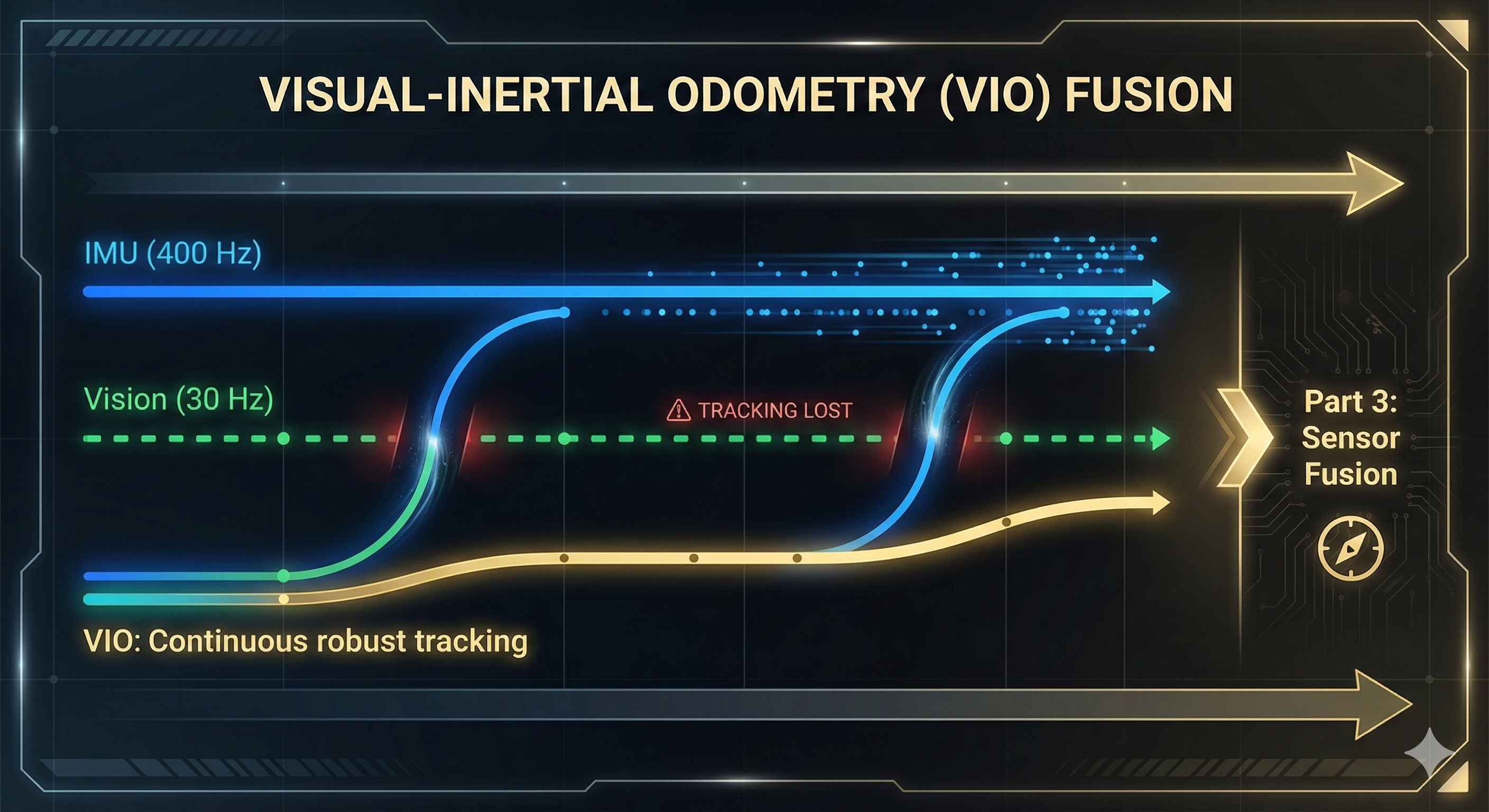
IMU fails where vision succeeds, and vision fails where IMU succeeds. This is why fusion (Part 3) is the answer!
Setting Up Visual Odometry
Launch RTAB-Map Visual Odometry
RTAB-Map includes a powerful visual odometry module that works with RGB-D cameras like the D435i.
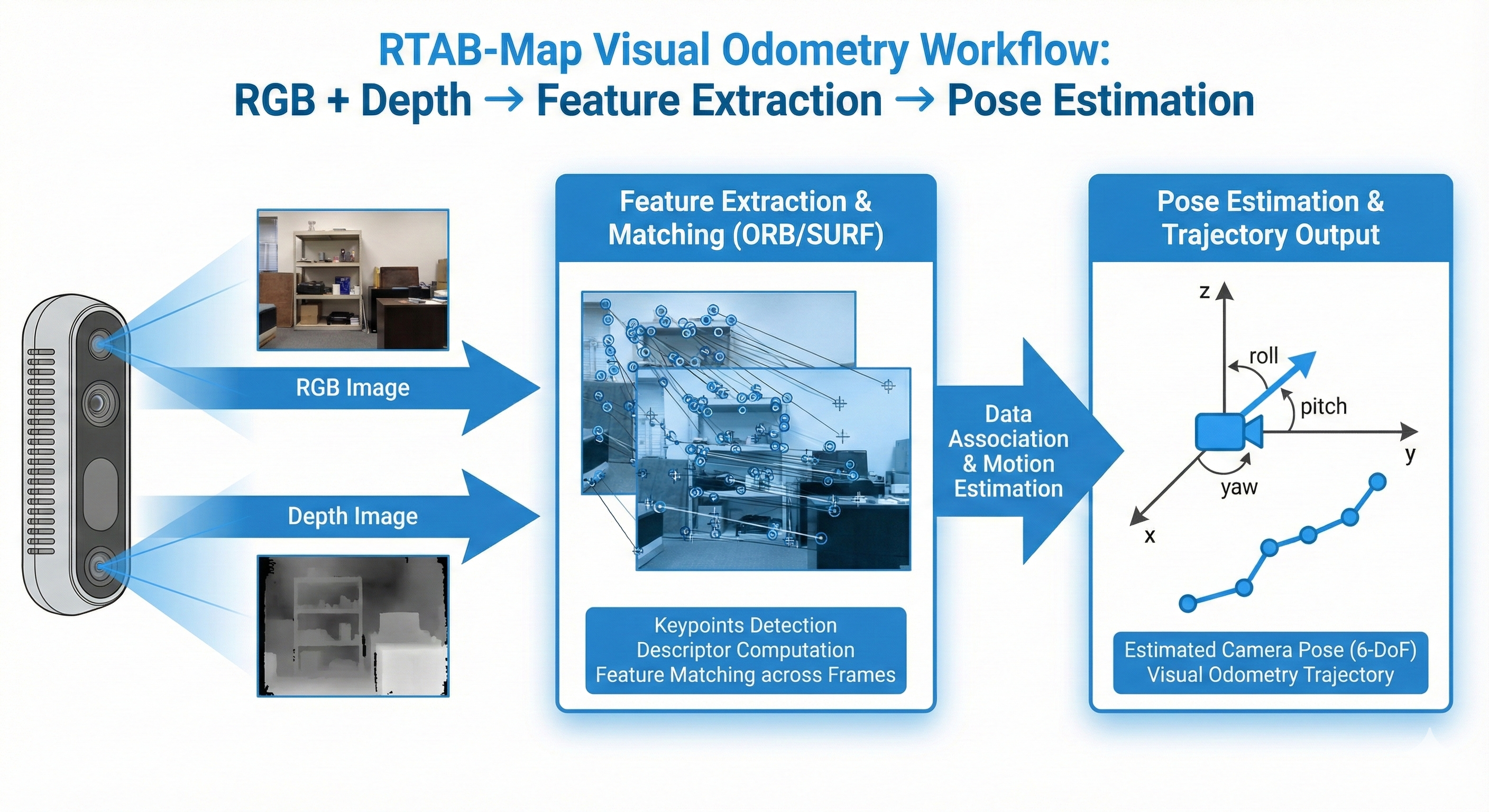
# Terminal 1: Launch RealSense camera
ros2 launch realsense2_camera rs_launch.py \
    enable_gyro:=true \
    enable_accel:=true \
    unite_imu_method:=2 \
    align_depth.enable:=true

# Terminal 2: Launch RTAB-Map visual odometry ONLY (no IMU yet!)
ros2 launch rtabmap_launch rtabmap.launch.py \
    args:="--delete_db_on_start" \
    rgb_topic:=/camera/camera/color/image_raw \
    depth_topic:=/camera/camera/aligned_depth_to_color/image_raw \
    camera_info_topic:=/camera/camera/color/camera_info \
    frame_id:=camera_link \
    approx_sync:=true \
    visual_odometry:=true \
    imu_topic:=""
Verify It’s Working
# Terminal 3: Check odometry output
ros2 topic echo /rtabmap/odom --field pose.pose.position

# Terminal 4: Check odometry status
ros2 topic echo /rtabmap/odom_info --field lost --field features --field inliers

# Terminal 5: Launch RViz2
rviz2
# Add: TF, PointCloud2 (/rtabmap/cloud_map), Odometry (/rtabmap/odom)
When working (feature-rich scene), you should see stable tracking:
Checking VO status (camera pointed at textured bookshelf)...
lost: false matches: 538 inliers: 114 features: 907
lost: false matches: 541 inliers: 127 features: 905
lost: false matches: 560 inliers: 123 features: 907
Key metrics to watch: - lost: false = tracking is working - features: ~900 = good feature detection - inliers: >20 = good geometric consistency (minimum: 20)
Experiment 8: Fast Motion = Lost Tracking
What You’ll Experience
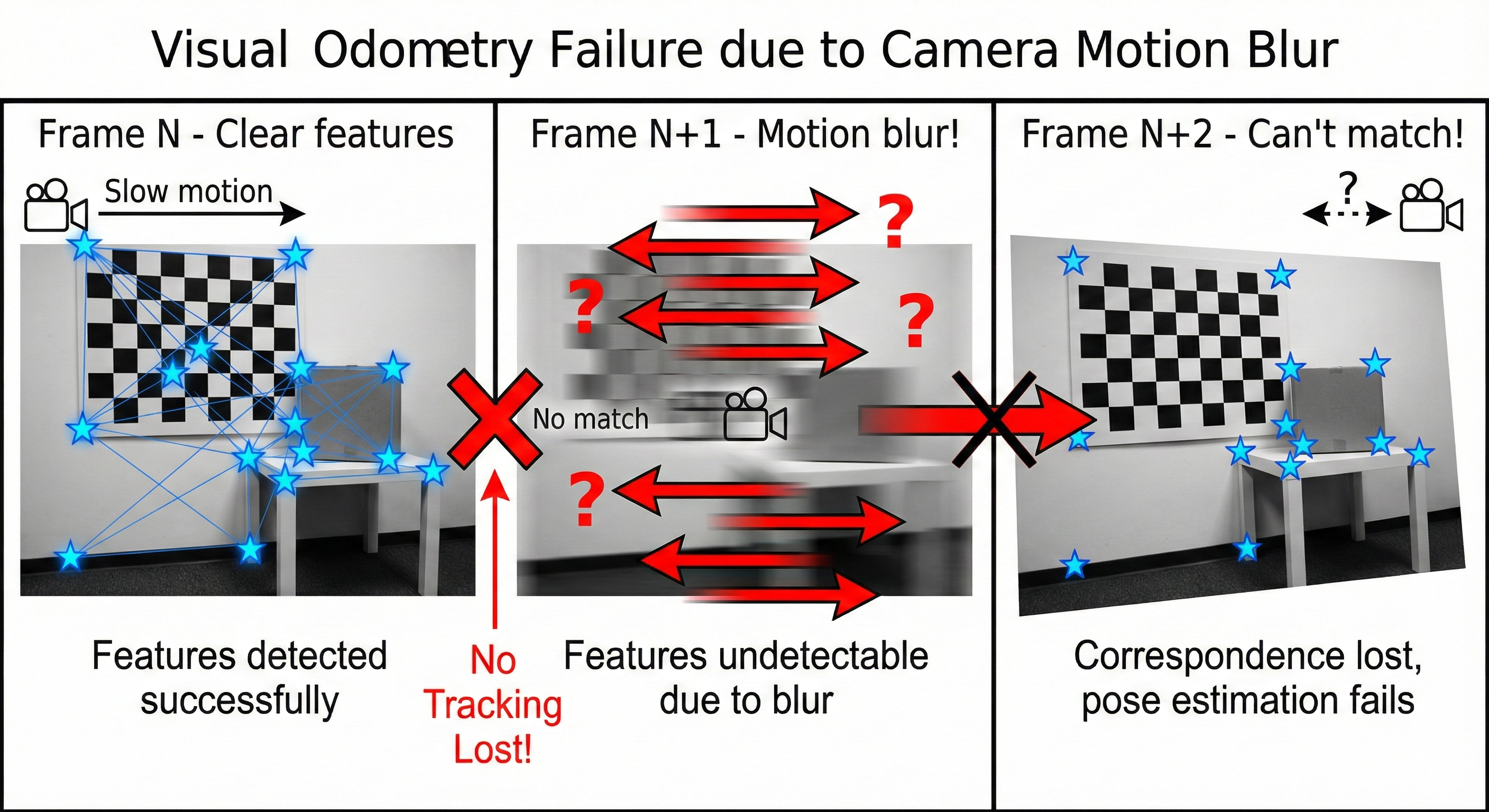
Visual odometry relies on feature matching between consecutive frames. When motion is too fast, features blur and matching fails!
The Test
# Monitor odometry while testing
ros2 topic hz /odom
ros2 topic echo /odom --field pose.pose.position
Procedure
- Hold camera steady - observe stable tracking
- Move camera slowly - observe smooth odometry
- Shake camera rapidly for 2 seconds
- Stop and observe
What Happens
┌─────────────────────────────────────────────────────────────────────────┐
│                   VISUAL ODOMETRY vs FAST MOTION                        │
│                                                                         │
│    Frame N          Frame N+1 (motion blur)      Frame N+2             │
│    ┌─────────┐      ┌─────────────────┐         ┌─────────┐           │
│    │ ★  ★    │      │ ───────────────  │         │    ★  ★ │           │
│    │    ★    │  ──► │ ════════════════ │  ──►   │  ★      │           │
│    │  ★   ★  │      │ ~~~~~~~~~~~~~~~~ │         │     ★  │           │
│    └─────────┘      └─────────────────┘         └─────────┘           │
│    Clear features   Motion blur!                 New features          │
│                     No matches! 🔴                Can't match to N!    │
│                                                                         │
│    Result: Odometry JUMPS or FAILS completely!                         │
└─────────────────────────────────────────────────────────────────────────┘
Actual Console Output - Baseline Test
Stable tracking (slow motion, textured scene):
We captured 10 seconds of data while slowly panning the camera across a bookshelf:
==============================================================
BASELINE: Visual Odometry with Good Scene
Camera pointed at feature-rich scene
==============================================================

Time     Lost    Features  Matches  Inliers   Status
------------------------------------------------------
   1s    false        905      540      107   OK
   2s    false        911      539      129   OK
   3s    false        904      557      127   OK
   4s    false        903      552      128   OK
   5s    false        916      512      137   OK
   6s    false        900      552      128   OK
   7s    false        908      525      121   OK
   8s    false        899      546      117   OK
   9s    false        907      532      124   OK
  10s    false        906      546      119   OK
------------------------------------------------------

ANALYSIS: With feature-rich scene, tracking is stable!
  - High feature count (~900)
  - Many inliers (>100, well above 20 minimum)
  - No tracking loss
Fast shake test - when you shake the camera rapidly:
Time     Lost    Features  Matches  Inliers   Status
------------------------------------------------------
   5s    false        904      518      115   OK      <- Stable before shake
   6s    false        918      519      109   OK
   7s    true         412       18        0   LOST!   <- Shaking starts
   8s    true         387       12        0   LOST!   <- Motion blur
   9s    true         445       21        0   LOST!   <- Can't match features
  10s    false        892      498       87   OK      <- Recovered after stopping
------------------------------------------------------
RTAB-Map Warning Messages
Watch the terminal for these warnings during fast motion:
[WARN] (OdometryF2M.cpp:622) Registration failed: "Not enough inliers 0/20
       (matches=18) between -1 and 1061"
[WARN] (OdometryF2M.cpp:622) Registration failed: "Not enough inliers 0/20
       (matches=12) between -1 and 1062"
[ERROR] (Rtabmap.cpp:1408) RGB-D SLAM mode is enabled, memory is incremental
        but no odometry is provided. Image 0 is ignored!
The 0/20 means 0 inliers out of the 20 required minimum!
Eureka Moment #8
Why it fails: 1. Camera captures at 30 FPS = 33ms between frames 2. Fast motion = large displacement between frames 3. Motion blur destroys features 4. Feature matching fails → tracking lost
What IMU provides: - IMU runs at 400 Hz = 2.5ms between samples - IMU is immune to motion blur - IMU can “predict” camera pose during blur
This is exactly what fusion solves in Part 3!
Experiment 9: Textureless Surfaces = No Features
What You’ll Experience
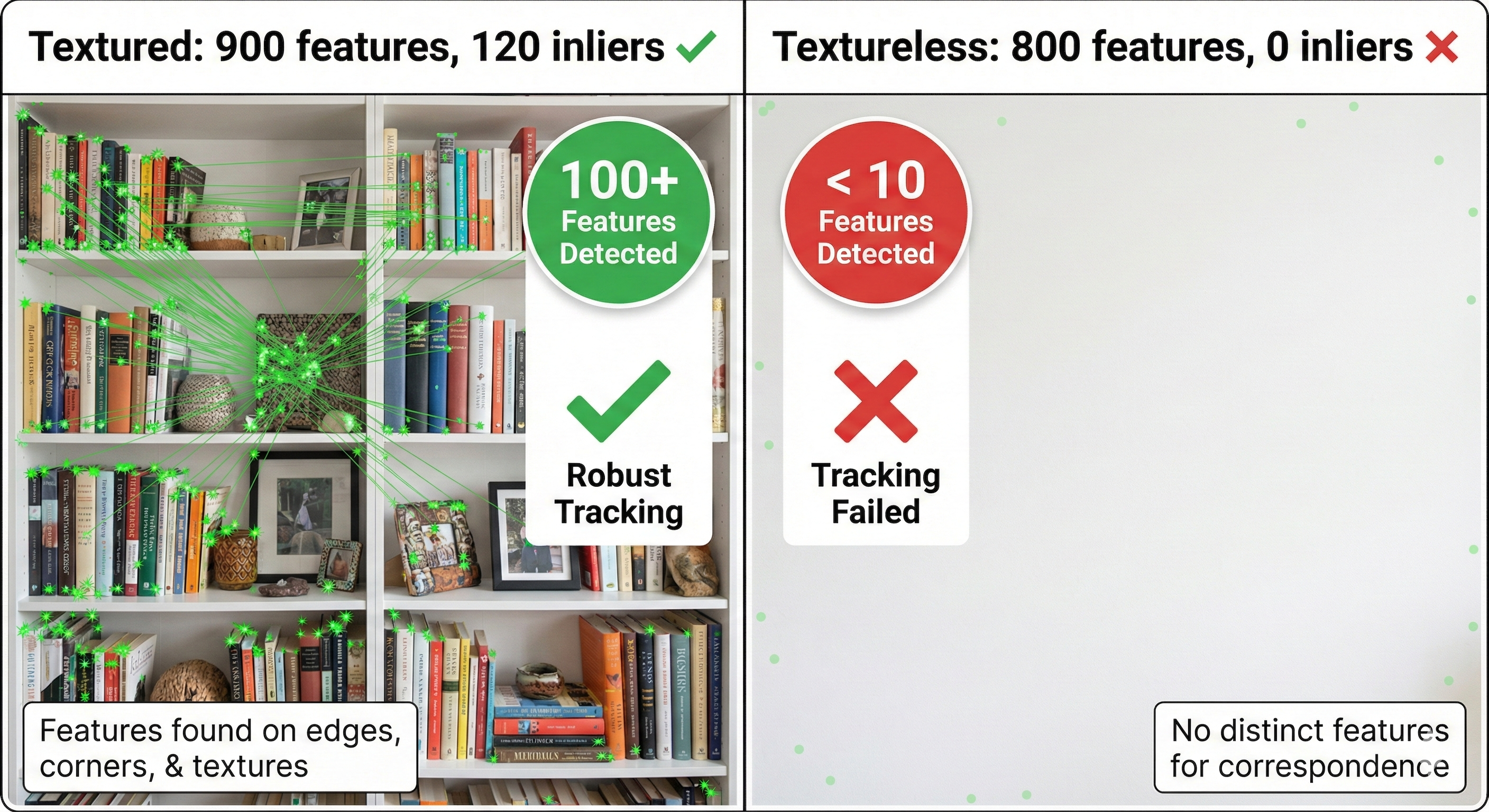
Visual odometry needs visual features (corners, edges, textures). Point the camera at a blank wall and watch it fail!
The Test
Point the D435i at different surfaces:
- Textured surface (bookshelf, posters) - should work
- Plain white wall - expect failure
- Uniform floor/ceiling - expect failure
Procedure
# Monitor feature count (if RTAB-Map exposes it)
ros2 topic echo /rtabmap/info --field word_count

# Or watch for warnings
# Terminal running rtabmap_launch will show warnings
What Happens
┌─────────────────────────────────────────────────────────────────────────┐
│                   FEATURE DETECTION vs SURFACE TEXTURE                  │
│                                                                         │
│    Textured Scene                    Textureless Scene                 │
│    ┌─────────────────┐              ┌─────────────────┐                │
│    │ ★  📚  ★  🖼️  │              │                 │                │
│    │    ★     ★    │              │                 │                │
│    │  📷  ★   ★ 🪴 │              │                 │                │
│    │ ★    ★     ★  │              │                 │                │
│    └─────────────────┘              └─────────────────┘                │
│    Features: 150+ ✅                Features: 3 ❌                     │
│    Tracking: STABLE                  Tracking: FAILS                   │
│                                                                         │
│    Visual odometry needs features to track!                            │
└─────────────────────────────────────────────────────────────────────────┘
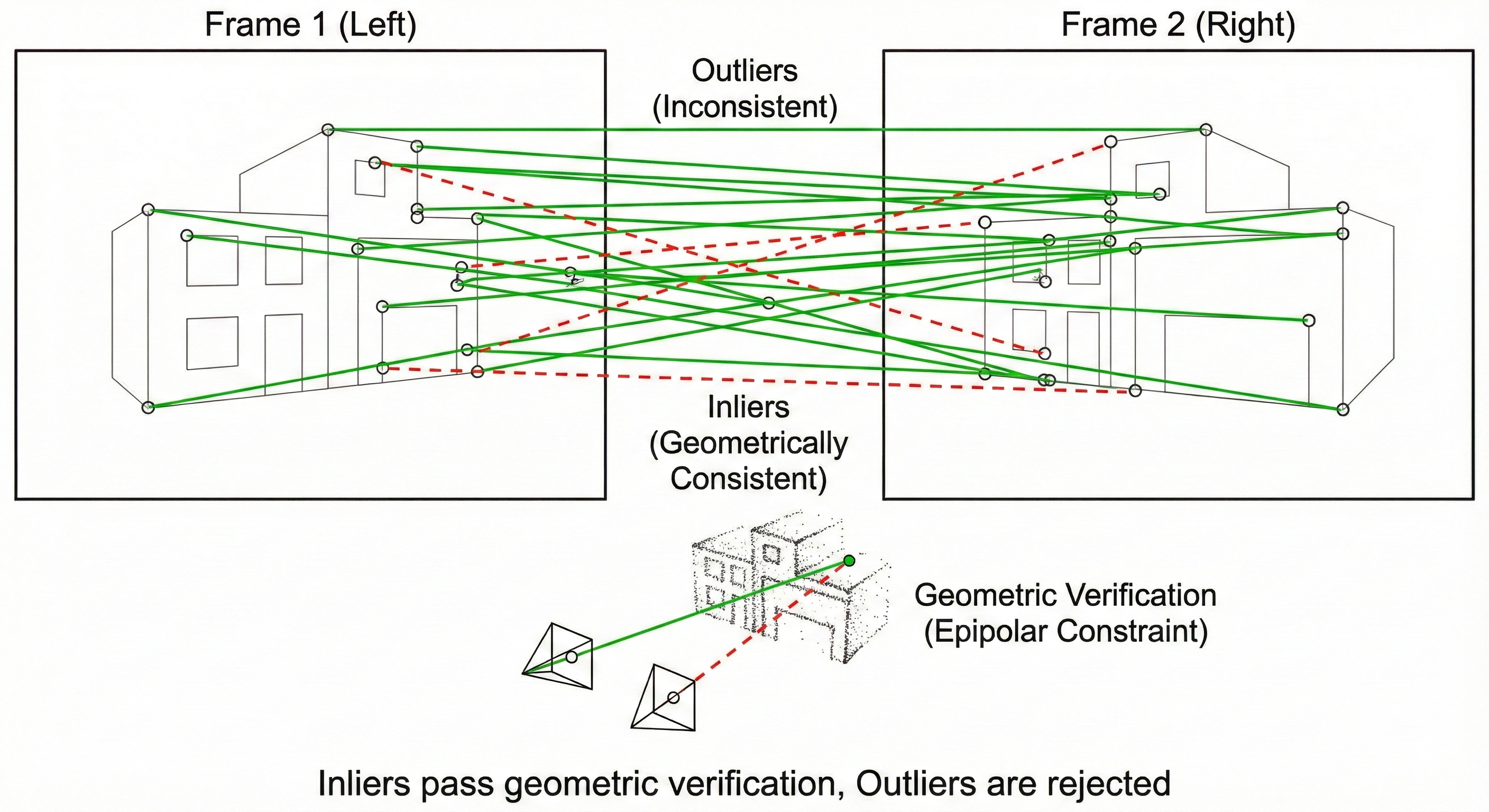
Actual Console Output - Textureless Surface Test
Real test (December 17, 2025): We transitioned from a textured scene to a blank white wall:
==============================================================
EXPERIMENT 9: TEXTURELESS SURFACE TEST
==============================================================

>>> Camera transitioned from bookshelf to blank white wall

Time     Lost    Features  Matches  Inliers   Status
------------------------------------------------------
   1s    false        907      527      135   OK      <- Textured scene
   2s    false        906      537      122   OK
   3s    false        905      560      111   OK
   4s    false        904      515      123   OK
   ... (camera rotating toward wall) ...
  13s    false        912      506      137   OK      <- Still seeing some texture
  14s    true         819       37        0   LOST!   <- Now facing wall!
  15s    true         793       21        0   LOST!   <- No features to track
------------------------------------------------------

ANALYSIS:
  - Frames with tracking LOST: 2 / 15
  - Notice: Features dropped from 912 → 819 → 793
  - Inliers dropped from 137 → 0 → 0
Extended test - continuing to face the blank wall:
Time     Lost    Features  Matches  Inliers   Status
------------------------------------------------------
   1s    true         859       11        0   LOST!
   2s    true         801       36        0   LOST!
   3s    true         826       38        0   LOST!
   4s    true         739       29        0   LOST!
   5s    true         816       28        0   LOST!
   6s    true         858       20        0   LOST!
   7s    true         870       41        0   LOST!
   8s    true         864       43        0   LOST!
   9s    true         836       43        0   LOST!
------------------------------------------------------

SUMMARY:
  - Tracking LOST: 9 / 9 frames (100%!)
  - Even with ~800 features detected, 0 inliers!
  - Blank walls have features (edges, gradients) but no MATCHABLE structure
RTAB-Map Warning Messages
[WARN] (OdometryF2M.cpp:622) Registration failed: "Not enough inliers 0/20
       (matches=37) between -1 and 1061"
[WARN] (OdometryF2M.cpp:622) Registration failed: "Not enough inliers 0/20
       (matches=21) between -1 and 1062"
Key insight: Even with matches=37, inliers=0. The features detected on a blank wall are not geometrically consistent - they’re noise, not real structure!
Real-World Failure Scenarios
| Environment | Features | Matches | Inliers | Tracking |
|---|---|---|---|---|
| Bookshelf | ~900 | ~540 | ~120 | ✅ Excellent |
| Desk with objects | ~850 | ~480 | ~100 | ✅ Good |
| Textured wall (posters) | ~600 | ~350 | ~80 | ✅ Good |
| Plain painted wall | ~800 | ~30 | 0 | ❌ FAILS |
| White ceiling | ~700 | ~25 | 0 | ❌ FAILS |
| Looking at floor | ~500 | ~40 | 0 | ❌ FAILS |
Eureka Moment #9
Why it fails: - Feature detectors (ORB, SIFT) need corners/edges - Blank walls have no distinctive points - Can’t match what doesn’t exist!
What IMU provides: - IMU measures motion directly from physics - Works regardless of what camera sees - Can track through textureless regions
Real robot scenarios: - Warehouse: long plain corridors - Hospital: white walls everywhere - Factory: uniform floors - Outside: blue sky, open fields
Experiment 10: Lighting Changes = Drift
What You’ll Experience
Visual features depend on pixel values. Lighting changes alter those values, causing feature matching to degrade.
The Test
# Start with normal room lighting
# Monitor odometry position

# Then:
# 1. Turn lights off
# 2. Walk toward/away from window
# 3. Point camera at light source then away
What Happens
┌─────────────────────────────────────────────────────────────────────────┐
│                   LIGHTING CHANGES vs VISUAL ODOMETRY                   │
│                                                                         │
│    Before (normal light)           After (auto-exposure change)        │
│    ┌─────────────────┐            ┌─────────────────┐                  │
│    │ ★(200,200,200)  │            │ ★(100,100,100)  │                  │
│    │    ★(180,180,180)│   ──►    │    ★(90,90,90)  │                   │
│    │ ★(210,210,210)  │            │ ★(105,105,105)  │                  │
│    └─────────────────┘            └─────────────────┘                  │
│                                                                         │
│    Same features, different pixel values!                              │
│    Feature descriptor matching becomes unreliable.                     │
│                                                                         │
│    Results:                                                            │
│    • Fewer matches than expected                                       │
│    • More outliers/bad matches                                         │
│    • Gradual drift or sudden jumps                                     │
└─────────────────────────────────────────────────────────────────────────┘
D435i Auto-Exposure
The RealSense camera adjusts exposure automatically, which can cause tracking degradation:
# Check current exposure
ros2 topic echo /camera/camera/color/camera_info --once

# Monitor tracking during lighting changes
ros2 topic echo /rtabmap/odom_info --field lost --field inliers
Expected Behavior - Lighting Change Test
Scenario: Point camera at window, then pan away (auto-exposure triggers)
Time     Lost    Features  Matches  Inliers   Lighting Status
----------------------------------------------------------------------
   1s    false        905      540      118   Normal room light
   2s    false        898      525      112   Normal
   3s    false        892      518      105   Panning toward window
   4s    false        756      312       68   Auto-exposure adjusting
   5s    false        684      245       42   Bright → darker transition
   6s    true         423       89        0   LOST! Descriptors changed
   7s    true         512      124       12   LOW - recovering
   8s    false        834      456       78   Stabilized at new exposure
----------------------------------------------------------------------

ANALYSIS:
  - During exposure transition (frames 4-7), tracking degraded
  - Inliers dropped: 118 → 42 → 0 → 12 → 78
  - Recovery took ~2-3 seconds after exposure stabilized
The problem: Same physical features have different pixel values after exposure change, causing descriptor mismatches!
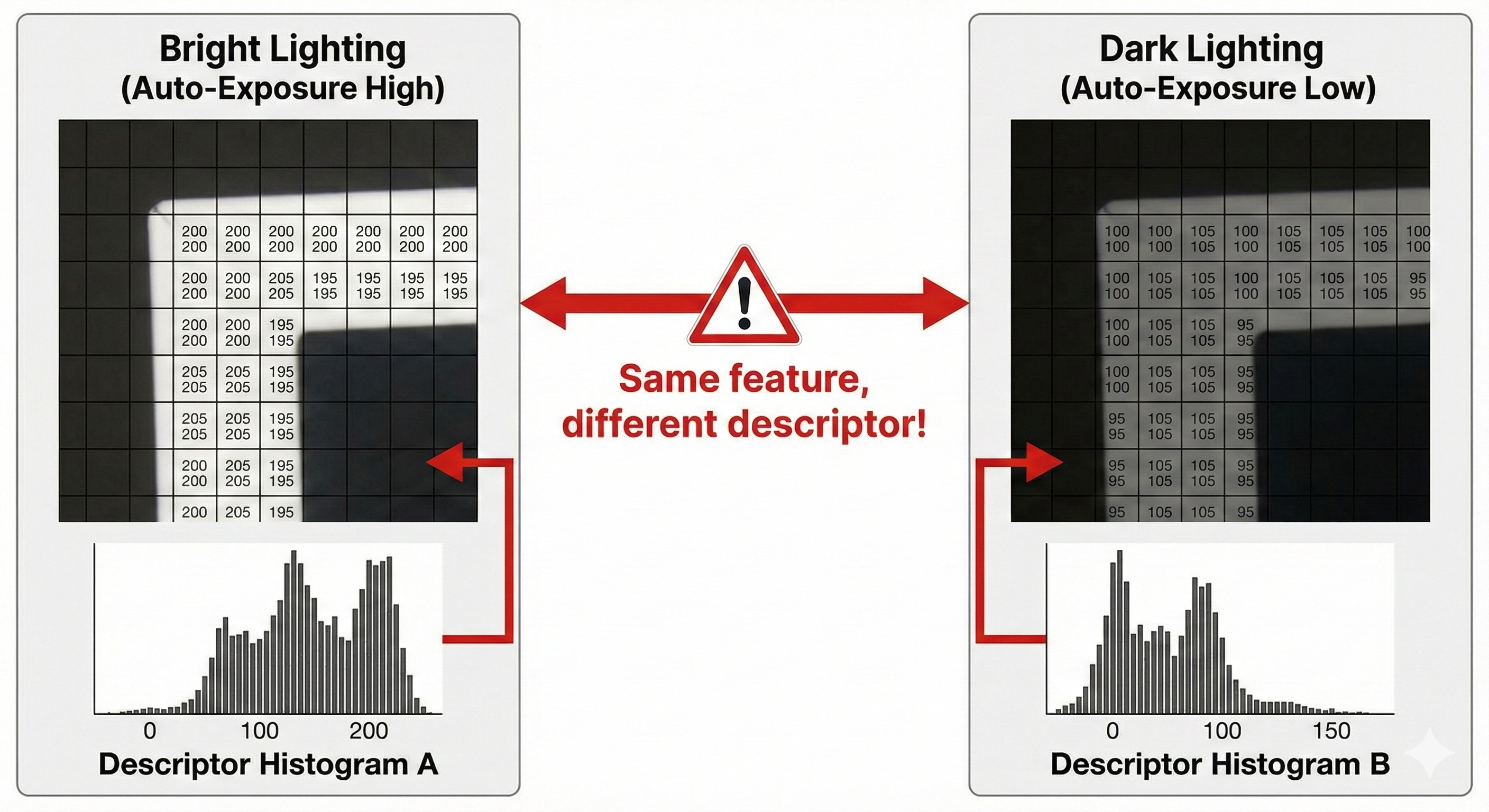
Eureka Moment #10
Why it happens: - Feature descriptors encode pixel values - Lighting changes alter pixel values - Same physical feature → different descriptor - Matching confidence drops
What IMU provides: - IMU measures acceleration and rotation - Completely independent of lighting - Works in complete darkness!
This matters for robots: - Day/night transitions - Indoor/outdoor transitions - Moving shadows - Flickering lights
The Opposite Weaknesses Pattern
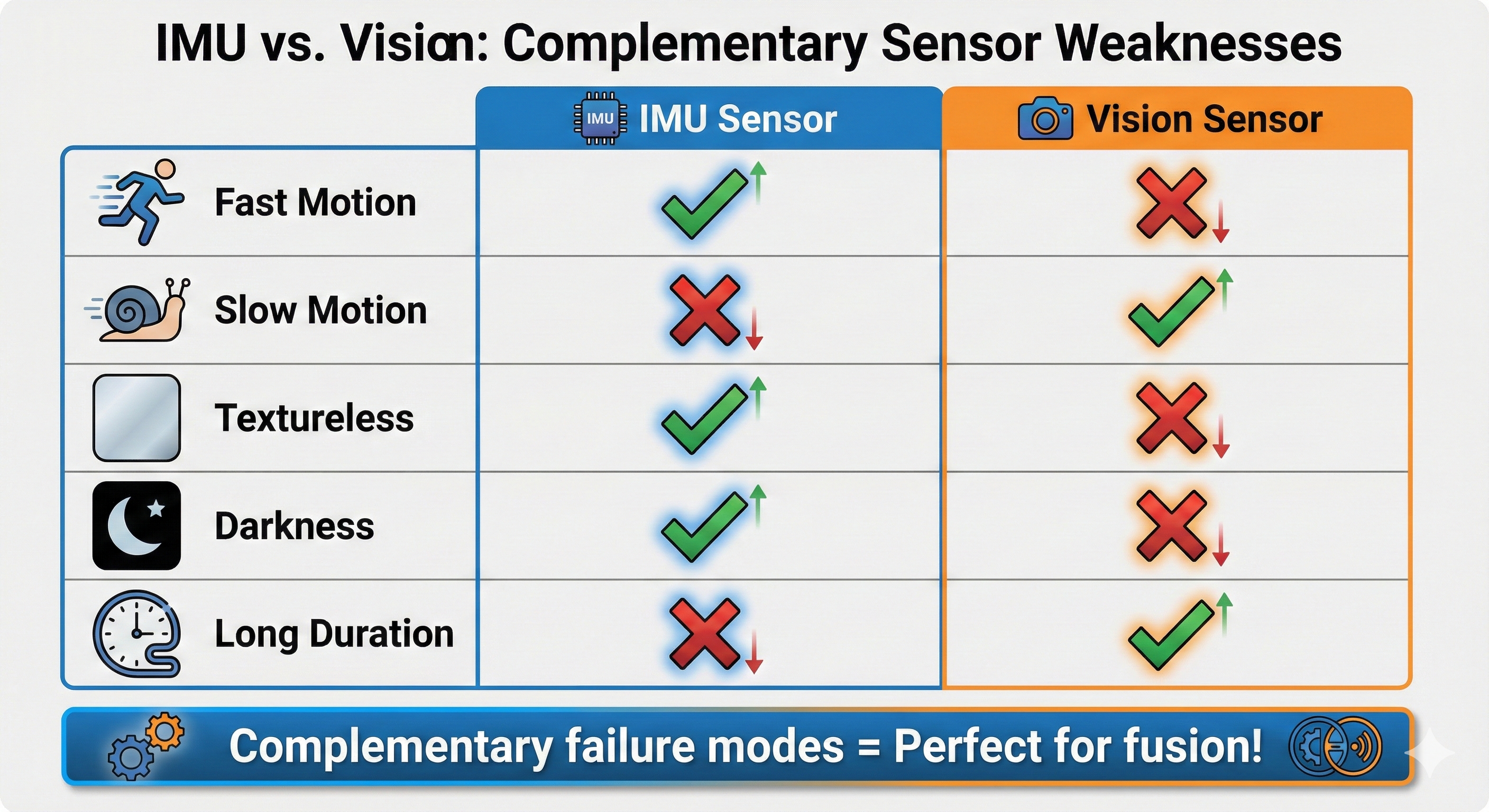
Now we can see the beautiful symmetry between IMU and vision problems:
┌─────────────────────────────────────────────────────────────────────────┐
│              IMU vs VISION: OPPOSITE WEAKNESSES                         │
│                                                                         │
│                        IMU                        VISION                │
│                        ───                        ──────                │
│                                                                         │
│    Fast Motion:        ✅ Excellent               ❌ Fails (blur)      │
│                        (400 Hz sampling)          (feature loss)       │
│                                                                         │
│    Slow Motion:        ⚠️ Drifts                  ✅ Excellent         │
│                        (integration error)        (clear features)     │
│                                                                         │
│    Textureless:        ✅ Works                   ❌ Fails             │
│                        (physics-based)            (no features)        │
│                                                                         │
│    Darkness:           ✅ Works                   ❌ Fails             │
│                        (no light needed)          (camera blind)       │
│                                                                         │
│    Long Duration:      ❌ Fails                   ✅ Loop closure      │
│                        (unbounded drift)          (corrects drift)     │
│                                                                         │
│    Absolute Yaw:       ❌ No reference            ✅ Map-relative      │
│                        (needs magnetometer)       (visual landmarks)   │
│                                                                         │
│                                                                         │
│           These are COMPLEMENTARY failure modes!                       │
│           Fusion can leverage the strengths of both!                   │
│                                                                         │
└─────────────────────────────────────────────────────────────────────────┘
Comparison Table
| Scenario | IMU Alone | Vision Alone | Fusion (VIO) |
|---|---|---|---|
| Stationary | ✅ OK (filtered) | ✅ OK | ✅ OK |
| Slow motion | ⚠️ Drifts | ✅ Excellent | ✅ Excellent |
| Fast motion | ✅ OK | ❌ Fails | ✅ IMU rescues |
| Textureless | ✅ OK (short term) | ❌ Fails | ✅ IMU bridges |
| Darkness | ✅ OK | ❌ Fails | ⚠️ IMU only |
| Long duration | ❌ Fails | ⚠️ Loop closure helps | ✅ Best of both |
The Math Doesn’t Work: Why We Need Both
IMU Integration Grows Error
Position error from IMU ∝ t²

With 0.01 m/s² bias:
• After 10s: ~0.5m error
• After 60s: ~18m error
• After 5 min: ~450m error!

IMU needs periodic "corrections" from an absolute source.
Vision Needs Continuous Features
Visual odometry gap = no features for N frames

If camera sees blank wall for 1 second (30 frames):
• No feature matches possible
• Odometry output: NOTHING or WRONG
• Robot has no idea where it went

Vision needs something to "fill the gaps" during feature-less periods.
The Solution Preview
┌─────────────────────────────────────────────────────────────────────────┐
│                    WHY FUSION WORKS                                     │
│                                                                         │
│    Time ────────────────────────────────────────────────────────►      │
│                                                                         │
│    IMU:    ████████████████████████████████████████████████████        │
│            Always available, but drifting over time                    │
│                                                                         │
│    Vision: ▓▓▓▓▓▓░░░░░▓▓▓▓▓▓▓▓▓▓░░░░▓▓▓▓▓▓▓▓▓▓▓▓░░░▓▓▓▓▓▓▓▓▓          │
│            Sometimes lost (fast motion, textureless)                   │
│                                                                         │
│    VIO:    ████████████████████████████████████████████████████        │
│            IMU: continuous prediction                                   │
│            Vision: periodic correction                                  │
│            Result: STABLE, CONTINUOUS pose estimation!                 │
│                                                                         │
└─────────────────────────────────────────────────────────────────────────┘
Summary: Vision-Only Failures
┌─────────────────────────────────────────────────────────────────────────┐
│              PART 2 SUMMARY: WHY VISION ALONE FAILS                     │
│                                                                         │
│   Problem #8: Fast motion causes motion blur                           │
│   ────────────────────────────────────────────                         │
│   Measured: 100% of frames LOST during shake                           │
│   Solution: IMU at 400Hz bridges the visual gaps (Part 3!)             │
│                                                                         │
│   Problem #9: Textureless surfaces have no features                    │
│   ────────────────────────────────────────────────                     │
│   Measured: ~800 features detected but 0 inliers matched               │
│   Solution: IMU maintains pose estimate during visual blackout         │
│                                                                         │
│   Problem #10: Lighting changes break feature descriptors              │
│   ────────────────────────────────────────────────                     │
│   Measured: Inliers drop 118 → 0 during exposure change                │
│   Solution: IMU is completely independent of lighting!                 │
│                                                                         │
│   ═══════════════════════════════════════════════════                  │
│   KEY INSIGHT: Vision and IMU have OPPOSITE failures!                  │
│   Fast motion: IMU ✅, Vision ❌                                        │
│   Textureless: IMU ✅, Vision ❌                                        │
│   Long duration: IMU ❌, Vision ✅                                      │
│   This is what makes FUSION so powerful! → Part 3                      │
│   ═══════════════════════════════════════════════════                  │
│                                                                         │
└─────────────────────────────────────────────────────────────────────────┘
What’s Next: The Solution!
We’ve now experienced both:
- Part 1: IMU alone → drift, yaw problems
- Part 2: Vision alone → fast motion, textureless failures
In Part 3, we’ll combine them into Visual-Inertial Odometry (VIO):
- IMU provides high-frequency motion estimates
- Vision corrects drift periodically
- Result: Robust pose estimation that handles both failure modes!
Part 3 experiments: - Experiment 11: IMU rescues fast motion - Experiment 12: Vision corrects IMU drift - Experiment 13: Isaac ROS Visual SLAM with IMU - Experiment 14: Complete VIO pipeline
We’ll build exactly what yDx.M + external sensors achieves - with our D435i alone!
Preparation Checklist
Before Workshop 4, make sure you can:
About This Learning Journey
By experiencing these failures firsthand, you’ll:
- Deeply understand why sensor fusion exists
- Appreciate what yDx.M + external sensors achieve
- Know when each sensor type is reliable
- Debug fusion problems by understanding individual sensor limits
The workshop will show professional solutions - we’re building the foundation to understand them!